Inicio rápido de Pilot Status: envía tu primer mensaje de WhatsApp
Crea tu cuenta de Pilot Status, conecta un número de WhatsApp y envía tu primer mensaje con la API REST. Sin configurar servidores ni proxies.
Esta guía te lleva por todo lo que necesitas para pasar de cero a enviar tu primer mensaje de WhatsApp con la API de Pilot Status. Crearás una cuenta, conectarás un número, obtendrás tu API key y harás una llamada real a la API, sin configurar servidores ni proxies.
1
Crea tu cuenta
Ve a pilotstatus.com.br y regístrate para obtener una cuenta gratuita. El plan gratuito incluye un número de WhatsApp y hasta 200 mensajes, sin necesidad de tarjeta de crédito.
2
Conecta tu número
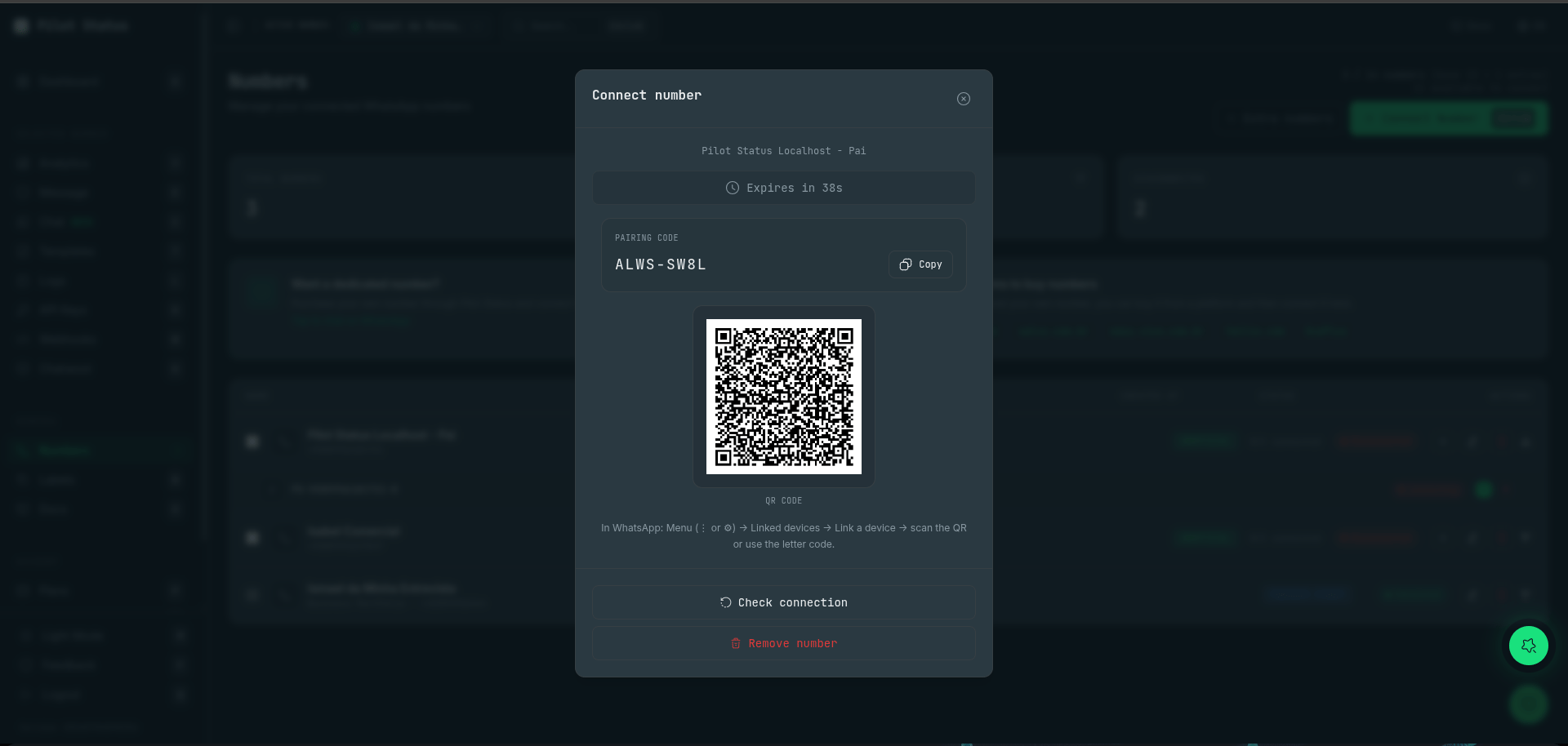
En el panel, haz clic en Connect Number (Conectar número) y elige tu método de conexión:
Código QR (no oficial): abre WhatsApp en tu teléfono, toca Dispositivos vinculados → Vincular un dispositivo y escanea el código QR que aparece en el panel.
Credenciales de Meta (oficial): selecciona el modo Cloud API o Coexistence y luego ingresa tus credenciales de Meta Business y el ID de tu cuenta de WhatsApp Business.
Conectar un número: escanea el código QR o usa el código de vinculación con letras en WhatsApp (Dispositivos vinculados).
Tu número aparecerá como Connected (Conectado) cuando termine el enlace. Para ver el paso a paso completo de ambos métodos, consulta Conectar un número de WhatsApp.
3
Obtén tu API key
En el panel, abre la página API Keys (/api-keys) y copia la key de tu número conectado: empieza con ps_. Mantén este valor en secreto, ya que autentica cada solicitud que haces a la API.
4
Envía tu primer mensaje
Haz la siguiente solicitud, reemplazando ps_your_key_here con tu key y destinationNumber con un número de WhatsApp real en el que puedas verificar la entrega. La propia key identifica cuál de tus números envía el mensaje.
curl -X POST https://pilotstatus.com.br/v1/messages/send \
  -H "x-api-key: ps_your_key_here" \
  -H "Content-Type: application/json" \
  -d '{
    "destinationNumber": "+5511999999999",
    "text": "Hello from Pilot Status! 👋"
  }'
Una respuesta exitosa devuelve HTTP 202 con un id y un status de QUEUED. Pilot Status entrega el mensaje y dispara tu webhook a medida que llegan los eventos de entrega y lectura. El mismo endpoint también envía plantillas (templateId + variables) y multimedia (media + mediaType).
Los números de teléfono deben estar en formato E.164 con el + inicial, por ejemplo, +5511999999999 para un número brasileño (+55), código de área 11.
5
Recibe eventos
Para obtener confirmaciones de entrega en tiempo real, avisos de lectura y mensajes entrantes, crea un webhook en la página Webhooks del panel (o mediante POST /v1/webhooks). Pilot Status enviará por POST un payload JSON a tu URL en milisegundos tras cada evento. Puedes usar un servicio como Webhook.site para inspeccionar los payloads durante el desarrollo.
Qué sigue
Ahora que enviaste tu primer mensaje, explora el resto de la plataforma.
Conectar números
Aprende a agregar números oficiales y no oficiales, configurar el modo Coexistence y gestionar conexiones multi-tenant.
Webhooks
Entiende la estructura del payload del webhook y cómo manejar los eventos de entrega, lectura y mensajes entrantes.
Enviar mensajes
Envía texto, imágenes, documentos, audio, botones y mensajes de plantilla con la API REST.
Referencia de la API
Explora la referencia completa de endpoints con esquemas de solicitud, ejemplos de respuesta y códigos de error.
¿Esta página le ayudó?
⌘I
{"docsConfig":{"theme":"luma","$schema":"https://mintlify.com/docs.json","name":"Pilot Status","description":"Pilot Status — WhatsApp API \u0026 messaging infrastructure. Send and receive WhatsApp messages via REST API, webhooks, MCP server, and dashboard. Official (Meta Cloud API) and unofficial connections.","colors":{"primary":"#19E17D","light":"#2EE98C","dark":"#19E17D"},"logo":{"light":"https://mintcdn.com/iaxp/bFY4-GIf_icRI6gv/images/wordmark-light.svg?fit=max\u0026auto=format\u0026n=bFY4-GIf_icRI6gv\u0026q=85\u0026s=956be78168490eaf8ae153ff8c58b4a7","dark":"https://mintcdn.com/iaxp/OICBZy4RbSGLpCw_/images/wordmark-dark.svg?fit=max\u0026auto=format\u0026n=OICBZy4RbSGLpCw_\u0026q=85\u0026s=9ce419fd878af00cc2d3c22f36da8e23"},"favicon":"https://media.brand.dev/75fcb4cf-8fa0-40cb-b428-c03cb409236b.svg","api":{"playground":{"display":"interactive"}},"background":{"color":{"light":"#FCF5E9","dark":"#0B1419"}},"navbar":{"links":[{"href":"https://wa.me/5585984387245?text=Ol%C3%A1%21%20Vim%20pela%20documenta%C3%A7%C3%A3o%20da%20Pilot%20Status%20e%20preciso%20de%20suporte.","label":"Support"}],"primary":{"type":"button","label":"Get Started Free","href":"https://pilotstatus.com.br"}},"footer":{"socials":{"x":"https://x.com/pilotstatus"}},"contextual":{"options":["copy","view","chatgpt","claude"],"display":"header"},"markdown":{"instructions":["Integrating Pilot Status end to end? Follow https://docs.pilotstatus.com.br/guides/integrate-with-ai.md (pt-BR: https://docs.pilotstatus.com.br/pt-BR/guides/integrate-with-ai.md). No step requires contacting support: every credential is shown in the dashboard or in an API response, and a lost one is regenerated, not recovered.","Webhook signing secret: shown ONCE in the Signing secret window right after creating the webhook on /webhooks, and in the `secret` field of the POST /v1/webhooks response (MCP: webhooks_create). Lost it: Edit Webhook → Generate a new secret, POST /v1/webhooks/{id}/rotate-secret, or webhooks_rotate_secret (the old one stops working at once). Verify `x-pilot-status-signature` = hex HMAC-SHA256 of the raw request body keyed with that secret.","Meta verify token (number connected with the user's own Meta app credentials): Meta Number Created! window after connecting, then the number's card on Numbers (workspace Owner), or webhook.verifyToken in the POST /v1/numbers/meta response. It is not the webhook signing secret.","REST auth: `x-api-key: ps_...` header, never Authorization: Bearer. MCP: https://mcp.pilotstatus.com.br/mcp (148 tools, OAuth 2.1 or x-api-key); Code Mode: https://mcp.pilotstatus.com.br/code. Destructive MCP tools return a preview and a confirm_token: show the preview and call again only after the user's explicit yes. Over OAuth, revealing or creating ps_ API keys is workspace Owner only."]},"styling":{"latex":false},"navigation":{"languages":[{"language":"en","href":""},{"language":"pt-BR","navbar":{"links":[{"href":"https://wa.me/5585984387245?text=Ol%C3%A1%21%20Vim%20pela%20documenta%C3%A7%C3%A3o%20da%20Pilot%20Status%20e%20preciso%20de%20suporte.","label":"Suporte"}],"primary":{"type":"button","label":"Comece grátis","href":"https://pilotstatus.com.br"}},"href":"pt-BR"},{"language":"es","navbar":{"links":[{"href":"https://wa.me/5585984387245?text=%C2%A1Hola%21%20Vengo%20de%20la%20documentaci%C3%B3n%20de%20Pilot%20Status%20y%20necesito%20soporte.","label":"Soporte"}],"primary":{"type":"button","label":"Empiece gratis","href":"https://pilotstatus.com.br"}},"href":"es"}]}},"deployment":{"deploymentMetadataValue":{"subdomain":"iaxp","hasAudioNarration":false,"actualSubdomain":"iaxp","customDomains":["docs.pilotstatus.com.br"],"gitSource":{"type":"github","owner":"oismaelash","repo":"docs","deployBranch":"main","contentDirectory":"","isPrivate":false,"mountPath":"","label":""},"feedback":{"thumbs":true,"agentFeedback":true},"entitlements":{"AI_CHAT":{"status":"DISABLED"}},"buildId":"6b049d6082265a2364640795","clientVersion":"0.0.4304","searchFilterCounts":[{"language":"en","tag":"Playground","count":353},{"language":"en","tag":"Endpoints","count":327},{"language":"en","tag":"Evolution GO","count":75},{"language":"en","tag":"Evolution V2","count":69},{"language":"en","tag":"Documentation","count":68},{"language":"es","tag":"Documentación","count":68},{"language":"pt-BR","tag":"Documentação","count":68},{"language":"en","tag":"API Reference","count":62},{"language":"es","tag":"Referencia de la API","count":62},{"language":"pt-BR","tag":"Referência da API","count":62},{"language":"en","tag":"Phone Lines","count":30},{"language":"en","tag":"Meta Cloud API","count":26},{"language":"en","tag":"Workspace","count":26},{"language":"en","tag":"Numbers","count":19},{"language":"es","tag":"Panel","count":18},{"language":"es","tag":"Guías","count":18},{"language":"pt-BR","tag":"Painel","count":18},{"language":"pt-BR","tag":"Guias","count":18},{"language":"es","tag":"Mensajería","count":14},{"language":"pt-BR","tag":"Mensagens","count":14},{"language":"es","tag":"Conversaciones y datos","count":12},{"language":"pt-BR","tag":"Conversas \u0026 Dados","count":12},{"language":"es","tag":"Integraciones","count":9},{"language":"pt-BR","tag":"Integrações","count":9},{"language":"es","tag":"Líneas telefónicas","count":8},{"language":"es","tag":"Conceptos clave","count":8},{"language":"pt-BR","tag":"Linhas Telefônicas","count":8},{"language":"pt-BR","tag":"Conceitos","count":8},{"language":"es","tag":"Números","count":7},{"language":"pt-BR","tag":"Números","count":7}]},"assistantConfig":{"enableAskAiButton":false,"enableStarterQuestions":false,"enableContextualStarterQuestions":false,"enableAskAiSearchBar":true,"deflection":{"enabled":true,"email":"contato@ismaelnascimento.com"}},"basePath":"","hasChatPermissions":false,"hasWebMcpPermissions":false,"toggles":[{"name":"kill-isr","enabled":true,"variant":{"name":"disabled","enabled":false,"feature_enabled":true},"impressionData":false},{"name":"custom-rbac-roles","enabled":true,"variant":{"name":"disabled","enabled":false,"feature_enabled":true},"impressionData":false},{"name":"agent-mintlify-slack","enabled":true,"variant":{"name":"disabled","enabled":false,"feature_enabled":true},"impressionData":false},{"name":"agent-integrations-settings","enabled":true,"variant":{"name":"disabled","enabled":false,"feature_enabled":true},"impressionData":false},{"name":"rbac-expansion","enabled":true,"variant":{"name":"disabled","enabled":false,"feature_enabled":true},"impressionData":false},{"name":"automations-pr-grouping","enabled":true,"variant":{"name":"disabled","enabled":false,"feature_enabled":true},"impressionData":false},{"name":"custom-prefix","enabled":true,"variant":{"name":"disabled","enabled":false,"feature_enabled":true},"impressionData":false},{"name":"analytics-v7","enabled":true,"variant":{"name":"disabled","enabled":false,"feature_enabled":true},"impressionData":false},{"name":"user-flows-analytics","enabled":true,"variant":{"name":"disabled","enabled":false,"feature_enabled":true},"impressionData":false},{"name":"no-publish-flow","enabled":true,"variant":{"name":"disabled","enabled":false,"feature_enabled":true},"impressionData":false},{"name":"workos-onboarding","enabled":true,"variant":{"name":"disabled","enabled":false,"feature_enabled":true},"impressionData":false},{"name":"snapshot-serving-live","enabled":true,"variant":{"name":"disabled","enabled":false,"feature_enabled":true},"impressionData":false},{"name":"stripTemperatureMiddleware","enabled":true,"variant":{"name":"disabled","enabled":false,"feature_enabled":true},"impressionData":false},{"name":"support-platform-pylon-zendesk","enabled":true,"variant":{"name":"disabled","enabled":false,"feature_enabled":true},"impressionData":false},{"name":"snapshot-serving","enabled":true,"variant":{"name":"disabled","enabled":false,"feature_enabled":true},"impressionData":false},{"name":"instant-rollback","enabled":true,"variant":{"name":"disabled","enabled":false,"feature_enabled":true},"impressionData":false},{"name":"granular-notifications-server","enabled":true,"variant":{"name":"disabled","enabled":false,"feature_enabled":true},"impressionData":false},{"name":"granular-notifications","enabled":true,"variant":{"name":"disabled","enabled":false,"feature_enabled":true},"impressionData":false},{"name":"automations-fable","enabled":true,"variant":{"name":"disabled","enabled":false,"feature_enabled":true},"impressionData":false},{"name":"fixed-ai-action-pricing","enabled":true,"variant":{"name":"disabled","enabled":false,"feature_enabled":true},"impressionData":false},{"name":"site-roles","enabled":true,"variant":{"name":"disabled","enabled":false,"feature_enabled":true},"impressionData":false},{"name":"automation-resolve-merge-conflict","enabled":true,"variant":{"name":"disabled","enabled":false,"feature_enabled":true},"impressionData":false},{"name":"scoped-publishing","enabled":true,"variant":{"name":"disabled","enabled":false,"feature_enabled":true},"impressionData":false},{"name":"mintql","enabled":true,"variant":{"name":"disabled","enabled":false,"feature_enabled":true},"impressionData":false},{"name":"page-level-analytics","enabled":true,"variant":{"name":"disabled","enabled":false,"feature_enabled":true},"impressionData":false},{"name":"editor-version-history-v2","enabled":true,"variant":{"name":"disabled","enabled":false,"feature_enabled":true},"impressionData":false},{"name":"billing-page-v2","enabled":true,"variant":{"name":"disabled","enabled":false,"feature_enabled":true},"impressionData":false},{"name":"full-page-search","enabled":true,"variant":{"name":"disabled","enabled":false,"feature_enabled":true},"impressionData":false},{"name":"workspace-projects","enabled":true,"variant":{"name":"disabled","enabled":false,"feature_enabled":true},"impressionData":false},{"name":"assistant-v5","enabled":true,"variant":{"name":"disabled","enabled":false,"feature_enabled":true},"impressionData":false},{"name":"fork-pr-previews","enabled":true,"variant":{"name":"disabled","enabled":false,"feature_enabled":true},"impressionData":false},{"name":"revalidation-jwt","enabled":true,"variant":{"name":"disabled","enabled":false,"feature_enabled":true},"impressionData":false},{"name":"workos-sso-scim","enabled":true,"variant":{"name":"disabled","enabled":false,"feature_enabled":true},"impressionData":false},{"name":"hobby-abuse-scan","enabled":true,"variant":{"name":"disabled","enabled":false,"feature_enabled":true},"impressionData":false},{"name":"dashboard-inbox","enabled":true,"variant":{"name":"disabled","enabled":false,"feature_enabled":true},"impressionData":false},{"name":"workos-signup","enabled":true,"variant":{"name":"disabled","enabled":false,"feature_enabled":true},"impressionData":false},{"name":"turbopuffer-dual-write","enabled":true,"variant":{"name":"disabled","enabled":false,"feature_enabled":true},"impressionData":false},{"name":"workos-enabled","enabled":true,"variant":{"name":"disabled","enabled":false,"feature_enabled":true},"impressionData":false},{"name":"approve-review-flow","enabled":true,"variant":{"name":"disabled","enabled":false,"feature_enabled":true},"impressionData":false},{"name":"editor-metadata","enabled":true,"variant":{"name":"disabled","enabled":false,"feature_enabled":true},"impressionData":false},{"name":"sso-setup-deadline-banner","enabled":true,"variant":{"name":"disabled","enabled":false,"feature_enabled":true},"impressionData":false},{"name":"turbopuffer-serve","enabled":true,"variant":{"name":"disabled","enabled":false,"feature_enabled":true},"impressionData":false},{"name":"live-agents","enabled":true,"variant":{"name":"disabled","enabled":false,"feature_enabled":true},"impressionData":false},{"name":"starter-pricing","enabled":true,"variant":{"name":"treatment","enabled":true,"payload":{"type":"string","value":"treatment"},"feature_enabled":true},"impressionData":false},{"name":"llms-txt-v2","enabled":true,"variant":{"name":"disabled","enabled":false,"feature_enabled":true},"impressionData":false},{"name":"wildcard-email-auth","enabled":true,"variant":{"name":"disabled","enabled":false,"feature_enabled":true},"impressionData":false}],"googleFontsInlined":false},"customCss":[]}
{"page":{"pagePath":"es/quickstart","slug":"/es/quickstart","pageMetadata":{"title":"Inicio rápido de Pilot Status: envía tu primer mensaje de WhatsApp","sidebarTitle":"Inicio rápido","description":"Crea tu cuenta de Pilot Status, conecta un número de WhatsApp y envía tu primer mensaje con la API REST. Sin configurar servidores ni proxies.","mode":"wide","href":"/es/quickstart"},"description":{"compiledSource":"\"use strict\";\nconst {jsx: _jsx} = arguments[0];\nconst {useMDXComponents: _provideComponents} = arguments[0];\nfunction _createMdxContent(props) {\n const _components = {\n p: \"p\",\n ..._provideComponents(),\n ...props.components\n };\n return _jsx(_components.p, {\n children: \"Crea tu cuenta de Pilot Status, conecta un número de WhatsApp y envía tu primer mensaje con la API REST. Sin configurar servidores ni proxies.\"\n });\n}\nfunction MDXContent(props = {}) {\n const {wrapper: MDXLayout} = {\n ..._provideComponents(),\n ...props.components\n };\n return MDXLayout ? _jsx(MDXLayout, {\n ...props,\n children: _jsx(_createMdxContent, {\n ...props\n })\n }) : _createMdxContent(props);\n}\nreturn {\n default: MDXContent\n};\n","frontmatter":{},"scope":{}},"pageType":"default","mdx":{"mdxSource":{"compiledSource":"\"use strict\";const{Fragment:_Fragment,jsx:_jsx,jsxs:_jsxs}=arguments[0];const{useMDXComponents:_provideComponents}=arguments[0];function _createMdxContent(props){const _components={a:`a`,code:`code`,li:`li`,p:`p`,pre:`pre`,span:`span`,strong:`strong`,ul:`ul`,..._provideComponents(),...props.components},{Card,CardGroup,CodeBlock,CodeGroup,Frame,Heading,OptimizedImage,Step,Steps,Tip}=_components;if(!Card)_missingMdxReference(`Card`,true);if(!CardGroup)_missingMdxReference(`CardGroup`,true);if(!CodeBlock)_missingMdxReference(`CodeBlock`,true);if(!CodeGroup)_missingMdxReference(`CodeGroup`,true);if(!Frame)_missingMdxReference(`Frame`,true);if(!Heading)_missingMdxReference(`Heading`,true);if(!OptimizedImage)_missingMdxReference(`OptimizedImage`,true);if(!Step)_missingMdxReference(`Step`,true);if(!Steps)_missingMdxReference(`Steps`,true);if(!Tip)_missingMdxReference(`Tip`,true);return _jsxs(_Fragment,{children:[_jsx(_components.p,{children:`Esta guía te lleva por todo lo que necesitas para pasar de cero a enviar tu primer mensaje de WhatsApp con la API de Pilot Status. Crearás una cuenta, conectarás un número, obtendrás tu API key y harás una llamada real a la API, sin configurar servidores ni proxies.`}),`\n`,_jsxs(Steps,{children:[_jsx(Step,{title:`Crea tu cuenta`,children:_jsxs(_components.p,{children:[`Ve a `,_jsx(_components.a,{href:`https://pilotstatus.com.br`,children:`pilotstatus.com.br`}),` y regístrate para obtener una cuenta gratuita. El plan gratuito incluye un número de WhatsApp y hasta 200 mensajes, sin necesidad de tarjeta de crédito.`]})}),_jsxs(Step,{title:`Conecta tu número`,children:[_jsxs(_components.p,{children:[`En el panel, haz clic en `,_jsx(_components.strong,{children:`Connect Number`}),` (Conectar número) y elige tu método de conexión:`]}),_jsxs(_components.ul,{children:[`\n`,_jsxs(_components.li,{children:[_jsx(_components.strong,{children:`Código QR (no oficial):`}),` abre WhatsApp en tu teléfono, toca `,_jsx(_components.strong,{children:`Dispositivos vinculados → Vincular un dispositivo`}),` y escanea el código QR que aparece en el panel.`]}),`\n`,_jsxs(_components.li,{children:[_jsx(_components.strong,{children:`Credenciales de Meta (oficial):`}),` selecciona el modo Cloud API o Coexistence y luego ingresa tus credenciales de Meta Business y el ID de tu cuenta de WhatsApp Business.`]}),`\n`]}),_jsx(Frame,{caption:`Conectar un número: escanea el código QR o usa el código de vinculación con letras en WhatsApp (Dispositivos vinculados).`,children:_jsx(OptimizedImage,{src:`https://mintcdn.com/iaxp/67kV9q3n9SCt8FWI/images/dashboard/connect-qr.png?fit=max\u0026auto=format\u0026n=67kV9q3n9SCt8FWI\u0026q=85\u0026s=e1595097b9d02c57ef9644824c1e3358`,alt:`Conectar un número en el panel de Pilot Status`,\"data-og-width\":`1920`,width:`1920`,\"data-og-height\":`914`,height:`914`,\"data-path\":`images/dashboard/connect-qr.png`,\"data-optimize\":`true`,\"data-opv\":`3`,srcset:`https://mintcdn.com/iaxp/67kV9q3n9SCt8FWI/images/dashboard/connect-qr.png?w=280\u0026fit=max\u0026auto=format\u0026n=67kV9q3n9SCt8FWI\u0026q=85\u0026s=cd3d627b96c7c1e294ac1bbf3be2b840 280w, https://mintcdn.com/iaxp/67kV9q3n9SCt8FWI/images/dashboard/connect-qr.png?w=560\u0026fit=max\u0026auto=format\u0026n=67kV9q3n9SCt8FWI\u0026q=85\u0026s=cc9fee7b4af643e4dc98c2ccfc4526c0 560w, https://mintcdn.com/iaxp/67kV9q3n9SCt8FWI/images/dashboard/connect-qr.png?w=840\u0026fit=max\u0026auto=format\u0026n=67kV9q3n9SCt8FWI\u0026q=85\u0026s=9830bfdf3b6b40a6504a89e275ef111c 840w, https://mintcdn.com/iaxp/67kV9q3n9SCt8FWI/images/dashboard/connect-qr.png?w=1100\u0026fit=max\u0026auto=format\u0026n=67kV9q3n9SCt8FWI\u0026q=85\u0026s=0d5f99bbd783b852975db2d7688dcea9 1100w, https://mintcdn.com/iaxp/67kV9q3n9SCt8FWI/images/dashboard/connect-qr.png?w=1650\u0026fit=max\u0026auto=format\u0026n=67kV9q3n9SCt8FWI\u0026q=85\u0026s=b3204fb5fccd22b9fc2e2d93913aa348 1650w, https://mintcdn.com/iaxp/67kV9q3n9SCt8FWI/images/dashboard/connect-qr.png?w=2500\u0026fit=max\u0026auto=format\u0026n=67kV9q3n9SCt8FWI\u0026q=85\u0026s=c7787b0a55b430c969a1fb8568e35e95 2500w`})}),_jsxs(_components.p,{children:[`Tu número aparecerá como `,_jsx(_components.strong,{children:`Connected`}),` (Conectado) cuando termine el enlace. Para ver el paso a paso completo de ambos métodos, consulta `,_jsx(_components.a,{href:`/es/connecting-numbers`,children:`Conectar un número de WhatsApp`}),`.`]})]}),_jsx(Step,{title:`Obtén tu API key`,children:_jsxs(_components.p,{children:[`En el panel, abre la página `,_jsx(_components.strong,{children:`API Keys`}),` (`,_jsx(_components.code,{children:`/api-keys`}),`) y copia la key de tu número conectado: empieza con `,_jsx(_components.code,{children:`ps_`}),`. Mantén este valor en secreto, ya que autentica cada solicitud que haces a la API.`]})}),_jsxs(Step,{title:`Envía tu primer mensaje`,children:[_jsxs(_components.p,{children:[`Haz la siguiente solicitud, reemplazando `,_jsx(_components.code,{children:`ps_your_key_here`}),` con tu key y `,_jsx(_components.code,{children:`destinationNumber`}),` con un número de WhatsApp real en el que puedas verificar la entrega. La propia key identifica cuál de tus números envía el mensaje.`]}),_jsx(CodeGroup,{children:_jsx(CodeBlock,{filename:`cURL`,numberOfLines:`7`,language:`shellscript`,children:_jsx(_components.pre,{className:`shiki shiki-themes github-light-default dark-plus`,style:{backgroundColor:`#ffffff`,\"--shiki-dark-bg\":`#0B0C0E`,color:`#1f2328`,\"--shiki-dark\":`#D4D4D4`},language:`shellscript`,children:_jsxs(_components.code,{language:`shellscript`,numberOfLines:`7`,children:[_jsxs(_components.span,{className:`line`,children:[_jsx(_components.span,{style:{color:`#953800`,\"--shiki-dark\":`#DCDCAA`},children:`curl`}),_jsx(_components.span,{style:{color:`#0550AE`,\"--shiki-dark\":`#569CD6`},children:` -X`}),_jsx(_components.span,{style:{color:`#0A3069`,\"--shiki-dark\":`#CE9178`},children:` POST`}),_jsx(_components.span,{style:{color:`#0A3069`,\"--shiki-dark\":`#CE9178`},children:` https://pilotstatus.com.br/v1/messages/send`}),_jsx(_components.span,{style:{color:`#CF222E`,\"--shiki-dark\":`#D7BA7D`},children:` \\\\`})]}),`\n`,_jsxs(_components.span,{className:`line`,children:[_jsx(_components.span,{style:{color:`#0550AE`,\"--shiki-dark\":`#569CD6`},children:` -H`}),_jsx(_components.span,{style:{color:`#0A3069`,\"--shiki-dark\":`#CE9178`},children:` \"x-api-key: ps_your_key_here\"`}),_jsx(_components.span,{style:{color:`#CF222E`,\"--shiki-dark\":`#D7BA7D`},children:` \\\\`})]}),`\n`,_jsxs(_components.span,{className:`line`,children:[_jsx(_components.span,{style:{color:`#0550AE`,\"--shiki-dark\":`#569CD6`},children:` -H`}),_jsx(_components.span,{style:{color:`#0A3069`,\"--shiki-dark\":`#CE9178`},children:` \"Content-Type: application/json\"`}),_jsx(_components.span,{style:{color:`#CF222E`,\"--shiki-dark\":`#D7BA7D`},children:` \\\\`})]}),`\n`,_jsxs(_components.span,{className:`line`,children:[_jsx(_components.span,{style:{color:`#0550AE`,\"--shiki-dark\":`#569CD6`},children:` -d`}),_jsx(_components.span,{style:{color:`#0A3069`,\"--shiki-dark\":`#CE9178`},children:` '{`})]}),`\n`,_jsx(_components.span,{className:`line`,children:_jsx(_components.span,{style:{color:`#0A3069`,\"--shiki-dark\":`#CE9178`},children:` \"destinationNumber\": \"+5511999999999\",`})}),`\n`,_jsx(_components.span,{className:`line`,children:_jsx(_components.span,{style:{color:`#0A3069`,\"--shiki-dark\":`#CE9178`},children:` \"text\": \"Hello from Pilot Status! 👋\"`})}),`\n`,_jsx(_components.span,{className:`line`,children:_jsx(_components.span,{style:{color:`#0A3069`,\"--shiki-dark\":`#CE9178`},children:` }'`})}),`\n`]})})})}),_jsxs(_components.p,{children:[`Una respuesta exitosa devuelve `,_jsx(_components.code,{children:`HTTP 202`}),` con un `,_jsx(_components.code,{children:`id`}),` y un `,_jsx(_components.code,{children:`status`}),` de `,_jsx(_components.code,{children:`QUEUED`}),`. Pilot Status entrega el mensaje y dispara tu webhook a medida que llegan los eventos de entrega y lectura. El mismo endpoint también envía plantillas (`,_jsx(_components.code,{children:`templateId`}),` + `,_jsx(_components.code,{children:`variables`}),`) y multimedia (`,_jsx(_components.code,{children:`media`}),` + `,_jsx(_components.code,{children:`mediaType`}),`).`]}),_jsx(Tip,{children:_jsxs(_components.p,{children:[`Los números de teléfono deben estar en formato E.164 `,_jsxs(_components.strong,{children:[`con el `,_jsx(_components.code,{children:`+`}),` inicial`]}),`, por ejemplo, `,_jsx(_components.code,{children:`+5511999999999`}),` para un número brasileño (+55), código de área 11.`]})})]}),_jsx(Step,{title:`Recibe eventos`,children:_jsxs(_components.p,{children:[`Para obtener confirmaciones de entrega en tiempo real, avisos de lectura y mensajes entrantes, crea un webhook en la página `,_jsx(_components.strong,{children:`Webhooks`}),` del panel (o mediante `,_jsx(_components.code,{children:`POST /v1/webhooks`}),`). Pilot Status enviará por POST un payload JSON a tu URL en milisegundos tras cada evento. Puedes usar un servicio como `,_jsx(_components.a,{href:`https://webhook.site`,children:`Webhook.site`}),` para inspeccionar los payloads durante el desarrollo.`]})})]}),`\n`,_jsx(Heading,{level:`2`,id:`qué-sigue`,children:`Qué sigue`}),`\n`,_jsx(_components.p,{children:`Ahora que enviaste tu primer mensaje, explora el resto de la plataforma.`}),`\n`,_jsxs(CardGroup,{cols:2,children:[_jsx(Card,{title:`Conectar números`,icon:`mobile`,href:`/es/connecting-numbers`,children:_jsx(_components.p,{children:`Aprende a agregar números oficiales y no oficiales, configurar el modo Coexistence y gestionar conexiones multi-tenant.`})}),_jsx(Card,{title:`Webhooks`,icon:`bolt`,href:`/es/concepts/webhooks`,children:_jsx(_components.p,{children:`Entiende la estructura del payload del webhook y cómo manejar los eventos de entrega, lectura y mensajes entrantes.`})}),_jsx(Card,{title:`Enviar mensajes`,icon:`paper-plane`,href:`/es/guides/send-messages`,children:_jsx(_components.p,{children:`Envía texto, imágenes, documentos, audio, botones y mensajes de plantilla con la API REST.`})}),_jsx(Card,{title:`Referencia de la API`,icon:`code`,href:`/es/api/overview`,children:_jsx(_components.p,{children:`Explora la referencia completa de endpoints con esquemas de solicitud, ejemplos de respuesta y códigos de error.`})})]})]})}function MDXContent(props={}){const{wrapper:MDXLayout}={..._provideComponents(),...props.components};return MDXLayout?_jsx(MDXLayout,{...props,children:_jsx(_createMdxContent,{...props})}):_createMdxContent(props)}return{default:MDXContent};function _missingMdxReference(id,component){throw new Error(`Expected `+(component?`component`:`object`)+\" `\"+id+\"` to be defined: you likely forgot to import, pass, or provide it.\")}","frontmatter":{},"scope":{"config":{},"pageMetadata":{"title":"Inicio rápido de Pilot Status: envía tu primer mensaje de WhatsApp","sidebarTitle":"Inicio rápido","description":"Crea tu cuenta de Pilot Status, conecta un número de WhatsApp y envía tu primer mensaje con la API REST. Sin configurar servidores ni proxies.","mode":"wide","href":"/es/quickstart"}}},"mdxSourceWithNoJs":null},"mdxExtracts":{"tableOfContents":[{"title":"Qué sigue","slug":"qué-sigue","depth":2,"children":[]}],"codeExamples":{}},"jsLinks":[],"subdomain":"iaxp","siteName":"Pilot Status","title":"Inicio rápido de Pilot Status: envía tu primer mensaje de WhatsApp - Pilot Status","navMaps":{"firstHrefInVersion":{},"firstHrefInLanguage":{"en":{"href":"/quickstart","matchLevel":1},"pt-BR":{"href":"/pt-BR/quickstart","matchLevel":1},"es":{"href":"/es/quickstart","matchLevel":0}}},"lastModified":"2026-11-21T14:28:08.534Z","originalFileLocation":"es/quickstart.mdx","locale":"es"},"headHtml":"\u003cscript data-mint-head>(function(){var d=document.documentElement,p=null;if(!p){try{p=localStorage.getItem(\"isDarkMode\")}catch(e){}if(p==='true')p='dark';else if(p==='false')p='light';if(p!=='light'\u0026\u0026p!=='dark'\u0026\u0026p!=='system')p=\"system\"}var r=p==='system'?(matchMedia(\"(prefers-color-scheme: dark)\").matches?'dark':'light'):p;d.classList.remove(r==='dark'?'light':'dark');d.classList.add(r);d.setAttribute(\"data-theme-preference\",p)})();\u003c/script>\u003cmeta data-mint-head name=\"description\" content=\"Crea tu cuenta de Pilot Status, conecta un número de WhatsApp y envía tu primer mensaje con la API REST. Sin configurar servidores ni proxies.\">\u003cmeta data-mint-head name=\"application-name\" content=\"Pilot Status\">\u003cmeta data-mint-head name=\"generator\" content=\"Mintlify\">\u003clink data-mint-head rel=\"apple-touch-icon\" type=\"image/svg+xml\" sizes=\"180x180\" href=\"https://media.brand.dev/75fcb4cf-8fa0-40cb-b428-c03cb409236b.svg\">\u003clink data-mint-head rel=\"icon\" type=\"image/svg+xml\" sizes=\"32x32\" href=\"https://media.brand.dev/75fcb4cf-8fa0-40cb-b428-c03cb409236b.svg\">\u003clink data-mint-head rel=\"icon\" type=\"image/svg+xml\" sizes=\"16x16\" href=\"https://media.brand.dev/75fcb4cf-8fa0-40cb-b428-c03cb409236b.svg\">\u003clink data-mint-head rel=\"shortcut icon\" type=\"image/svg+xml\" href=\"https://media.brand.dev/75fcb4cf-8fa0-40cb-b428-c03cb409236b.svg\">\u003cmeta data-mint-head property=\"og:title\" content=\"Inicio rápido de Pilot Status: envía tu primer mensaje de WhatsApp - Pilot Status\">\u003cmeta data-mint-head property=\"og:description\" content=\"Crea tu cuenta de Pilot Status, conecta un número de WhatsApp y envía tu primer mensaje con la API REST. Sin configurar servidores ni proxies.\">\u003cmeta data-mint-head property=\"og:site_name\" content=\"Pilot Status\">\u003cmeta data-mint-head property=\"og:url\" content=\"https://docs.pilotstatus.com.br/es/quickstart\">\u003cmeta data-mint-head property=\"og:type\" content=\"website\">\u003cmeta data-mint-head property=\"og:image\" content=\"https://iaxp.mintlify.site/_mintlify/api/og/v2?division=Primeros+pasos\u0026amp;title=Inicio+r%C3%A1pido+de+Pilot+Status%3A+env%C3%ADa+tu+primer+mensaje+de+WhatsApp\u0026amp;description=Crea+tu+cuenta+de+Pilot+Status%2C+conecta+un+n%C3%BAmero+de+WhatsApp+y+env%C3%ADa+tu+primer+mensaje+con+la+API+REST.+Sin+configurar+servidores+ni+proxies.\u0026amp;theme=352e12ee073c877df67f45f1\u0026amp;signature=8f73077390e6f0bf8e67d740e4f3678c1b335b9efc7655e6d434fb1eac4a481b\">\u003cmeta data-mint-head property=\"og:image:width\" content=\"1200\">\u003cmeta data-mint-head property=\"og:image:height\" content=\"630\">\u003cmeta data-mint-head name=\"twitter:card\" content=\"summary_large_image\">\u003cmeta data-mint-head name=\"twitter:title\" content=\"Inicio rápido de Pilot Status: envía tu primer mensaje de WhatsApp - Pilot Status\">\u003cmeta data-mint-head name=\"twitter:description\" content=\"Crea tu cuenta de Pilot Status, conecta un número de WhatsApp y envía tu primer mensaje con la API REST. Sin configurar servidores ni proxies.\">\u003cmeta data-mint-head name=\"twitter:image\" content=\"https://iaxp.mintlify.site/_mintlify/api/og/v2?division=Primeros+pasos\u0026amp;title=Inicio+r%C3%A1pido+de+Pilot+Status%3A+env%C3%ADa+tu+primer+mensaje+de+WhatsApp\u0026amp;description=Crea+tu+cuenta+de+Pilot+Status%2C+conecta+un+n%C3%BAmero+de+WhatsApp+y+env%C3%ADa+tu+primer+mensaje+con+la+API+REST.+Sin+configurar+servidores+ni+proxies.\u0026amp;theme=352e12ee073c877df67f45f1\u0026amp;signature=8f73077390e6f0bf8e67d740e4f3678c1b335b9efc7655e6d434fb1eac4a481b\">\u003cmeta data-mint-head name=\"twitter:image:width\" content=\"1200\">\u003cmeta data-mint-head name=\"twitter:image:height\" content=\"630\">\u003cmeta data-mint-head name=\"msapplication-config\" content=\"https://mintlify.s3.us-west-1.amazonaws.com/iaxp/_generated/favicon/browserconfig.xml?v=3\">\u003cmeta data-mint-head name=\"apple-mobile-web-app-title\" content=\"Pilot Status\">\u003cmeta data-mint-head name=\"msapplication-TileColor\" content=\"#19E17D\">\u003clink data-mint-head rel=\"canonical\" href=\"https://docs.pilotstatus.com.br/es/quickstart\">\u003clink data-mint-head rel=\"alternate\" type=\"application/xml\" href=\"/sitemap.xml\">\u003clink data-mint-head rel=\"alternate\" type=\"text/markdown\" href=\"/es/quickstart.md\">\u003clink data-mint-head rel=\"alternate\" hreflang=\"es\" href=\"https://docs.pilotstatus.com.br/es/quickstart\">\u003clink data-mint-head rel=\"alternate\" hreflang=\"en\" href=\"https://docs.pilotstatus.com.br/quickstart\">\u003clink data-mint-head rel=\"alternate\" hreflang=\"pt-BR\" href=\"https://docs.pilotstatus.com.br/pt-BR/quickstart\">\u003clink data-mint-head rel=\"alternate\" hreflang=\"x-default\" href=\"https://docs.pilotstatus.com.br/quickstart\">\u003cscript data-mint-head type=\"application/ld+json\">{\"@context\":\"https://schema.org\",\"@graph\":[{\"@type\":\"Organization\",\"@id\":\"https://docs.pilotstatus.com.br/#organization\",\"name\":\"Pilot Status\",\"url\":\"https://docs.pilotstatus.com.br\",\"logo\":{\"@type\":\"ImageObject\",\"url\":\"https://mintcdn.com/iaxp/bFY4-GIf_icRI6gv/images/wordmark-light.svg?fit=max\u0026auto=format\u0026n=bFY4-GIf_icRI6gv\u0026q=85\u0026s=956be78168490eaf8ae153ff8c58b4a7\"}},{\"@type\":\"WebSite\",\"@id\":\"https://docs.pilotstatus.com.br#website\",\"name\":\"Pilot Status\",\"url\":\"https://docs.pilotstatus.com.br\",\"publisher\":{\"@id\":\"https://docs.pilotstatus.com.br/#organization\"}},{\"@type\":\"WebPage\",\"@id\":\"https://docs.pilotstatus.com.br/es/quickstart#webpage\",\"url\":\"https://docs.pilotstatus.com.br/es/quickstart\",\"name\":\"Inicio rápido de Pilot Status: envía tu primer mensaje de WhatsApp\",\"description\":\"Crea tu cuenta de Pilot Status, conecta un número de WhatsApp y envía tu primer mensaje con la API REST. Sin configurar servidores ni proxies.\",\"dateModified\":\"2026-11-21T14:28:08.534Z\",\"isPartOf\":{\"@id\":\"https://docs.pilotstatus.com.br#website\"},\"breadcrumb\":{\"@id\":\"https://docs.pilotstatus.com.br/es/quickstart#breadcrumb\"}},{\"@type\":\"BreadcrumbList\",\"@id\":\"https://docs.pilotstatus.com.br/es/quickstart#breadcrumb\",\"itemListElement\":[{\"@type\":\"ListItem\",\"position\":1,\"name\":\"Primeros pasos\",\"item\":\"https://docs.pilotstatus.com.br/es\"},{\"@type\":\"ListItem\",\"position\":2,\"name\":\"Inicio rápido de Pilot Status: envía tu primer mensaje de WhatsApp\",\"item\":\"https://docs.pilotstatus.com.br/es/quickstart\"}]},{\"@type\":[\"Article\",\"TechArticle\"],\"@id\":\"https://docs.pilotstatus.com.br/es/quickstart#article\",\"headline\":\"Inicio rápido de Pilot Status: envía tu primer mensaje de WhatsApp\",\"name\":\"Inicio rápido de Pilot Status: envía tu primer mensaje de WhatsApp\",\"description\":\"Crea tu cuenta de Pilot Status, conecta un número de WhatsApp y envía tu primer mensaje con la API REST. Sin configurar servidores ni proxies.\",\"url\":\"https://docs.pilotstatus.com.br/es/quickstart\",\"mainEntityOfPage\":{\"@id\":\"https://docs.pilotstatus.com.br/es/quickstart#webpage\"},\"dateModified\":\"2026-11-21T14:28:08.534Z\",\"publisher\":{\"@id\":\"https://docs.pilotstatus.com.br/#organization\"},\"isPartOf\":{\"@id\":\"https://docs.pilotstatus.com.br#website\"}}]}\u003c/script>\u003cscript data-mint-head type=\"application/ld+json\">{\"@context\":\"https://schema.org\",\"@type\":\"WebSite\",\"name\":\"Pilot Status\",\"publisher\":{\"@type\":\"Organization\",\"name\":\"Pilot Status\"},\"provider\":{\"@type\":\"Organization\",\"name\":\"Mintlify\",\"url\":\"https://mintlify.com\"}}\u003c/script>","agentPointerHref":"/es/quickstart.md","siteName":"Pilot Status","nav":{"global":null,"languages":[{"language":"en","pages":[{"title":"en","href":"/quickstart"}]},{"language":"pt-BR","navbar":{"links":[{"href":"https://wa.me/5585984387245?text=Ol%C3%A1%21%20Vim%20pela%20documenta%C3%A7%C3%A3o%20da%20Pilot%20Status%20e%20preciso%20de%20suporte.","label":"Suporte"}],"primary":{"type":"button","label":"Comece grátis","href":"https://pilotstatus.com.br"}},"pages":[{"title":"pt-BR","href":"/pt-BR/quickstart"}]},{"language":"es","navbar":{"links":[{"href":"https://wa.me/5585984387245?text=%C2%A1Hola%21%20Vengo%20de%20la%20documentaci%C3%B3n%20de%20Pilot%20Status%20y%20necesito%20soporte.","label":"Soporte"}],"primary":{"type":"button","label":"Empiece gratis","href":"https://pilotstatus.com.br"}},"tabs":[{"tab":"Documentación","groups":[{"group":"Primeros pasos","pages":[{"title":"Pilot Status: API de WhatsApp e infraestructura de mensajería","sidebarTitle":"Inicio","href":"/es"},{"title":"Pilot Status: infraestructura de WhatsApp sin dolores de cabeza","sidebarTitle":"Introducción","description":"Infraestructura de WhatsApp administrada para desarrolladores. Conexiones oficiales y no oficiales, API REST, proxy administrado, webhooks y un dashboard completo incluidos.","mode":"wide","href":"/es/introduction"},{"title":"Inicio rápido de Pilot Status: envía tu primer mensaje de WhatsApp","sidebarTitle":"Inicio rápido","mode":"wide","href":"/es/quickstart"},{"title":"Integra Pilot Status con IA (Claude, ChatGPT, Cursor)","sidebarTitle":"Integrar con IA","description":"Checklist de integración de punta a punta para asistentes de IA: elige una clave ps_ u OAuth, conecta MCP, envía un mensaje, obtén el secreto de firma del webhook (se muestra una vez al crearlo; rótalo si lo pierdes, nunca lo pidas a soporte), verifica x-pilot-status-signature, el verify token de Meta, plantillas y errores comunes.","mode":"wide","href":"/es/guides/integrate-with-ai"},{"title":"Agrega y conecta números de WhatsApp en el panel de Pilot Status","sidebarTitle":"Conectar números","mode":"wide","href":"/es/connecting-numbers"}]},{"group":"Conceptos clave","pages":[{"title":"API oficial vs no oficial de WhatsApp: cuál usar","sidebarTitle":"Oficial vs no oficial","mode":"wide","href":"/es/concepts/official-vs-unofficial"},{"title":"Números de WhatsApp y arquitectura multi-tenant en Pilot Status","sidebarTitle":"Números y tenants","mode":"wide","href":"/es/concepts/numbers-and-tenants"},{"title":"Workspaces en Pilot Status: cuentas compartidas para equipos","sidebarTitle":"Workspaces","mode":"wide","href":"/es/concepts/workspaces"},{"title":"Roles y permisos en Pilot Status","sidebarTitle":"Roles y permisos","mode":"wide","href":"/es/concepts/roles-and-permissions"},{"title":"Tipos de API key: claves de número, de workspace y de cuenta","sidebarTitle":"Tipos de clave","mode":"wide","href":"/es/concepts/key-types"},{"title":"Webhooks en tiempo real: eventos de mensajes de Pilot Status","sidebarTitle":"Webhooks","mode":"wide","href":"/es/concepts/webhooks"},{"title":"Plantillas de mensaje reutilizables y variables en Pilot Status","sidebarTitle":"Plantillas","mode":"wide","href":"/es/concepts/templates"},{"mode":"wide","title":"WhatsApp Flows: formularios interactivos dentro del chat","sidebarTitle":"Flows","href":"/es/concepts/flows"}]},{"group":"Guías","pages":[{"title":"Enviar mensajes de WhatsApp por API | Pilot Status","sidebarTitle":"Enviar mensajes","mode":"wide","href":"/es/guides/send-messages"},{"title":"Chatbots con botones y listas, sin necesidad de plantilla","sidebarTitle":"Botones y listas (chatbots)","mode":"wide","href":"/es/guides/interactive-messages"},{"title":"Recibe mensajes de WhatsApp y eventos de entrega mediante webhooks","sidebarTitle":"Recibir mensajes","mode":"wide","href":"/es/guides/receive-messages"},{"title":"Envía un WhatsApp Flow sin plantilla","sidebarTitle":"Flows dinámicos","mode":"wide","href":"/es/guides/send-flow-dynamic"},{"title":"Recibe las respuestas de WhatsApp Flows en tu webhook","sidebarTitle":"Respuestas de Flows","mode":"wide","href":"/es/guides/flow-responses"},{"title":"Flows que responden con datos en vivo","sidebarTitle":"Flows con datos en vivo","mode":"wide","href":"/es/guides/flow-live-data"},{"title":"Conecta tu API a un WhatsApp Flow (data_exchange)","sidebarTitle":"Conecta tu API a un Flow","mode":"wide","href":"/es/guides/flow-data-exchange"},{"title":"Envía imágenes, videos y archivos con la API de WhatsApp","sidebarTitle":"Mensajes multimedia","mode":"wide","href":"/es/guides/media-messages"},{"title":"Crea agentes de WhatsApp con IA usando Pilot Status","sidebarTitle":"Agentes de IA","mode":"wide","href":"/es/guides/ai-agents"},{"title":"Migra a Pilot Status sin reescribir tu código","sidebarTitle":"Migración","mode":"wide","href":"/es/guides/migration"},{"title":"Meta Embedded Signup en tu app | Pilot Status","sidebarTitle":"Embedded Signup","mode":"wide","href":"/es/guides/embedded-signup"},{"title":"Registro de WhatsApp para Lovable, Replit, Bolt, v0 y Cursor | Pilot Status","sidebarTitle":"Registro para AI Builders","mode":"wide","href":"/es/guides/embedded-signup-ai-builders"},{"title":"Líneas telefónicas en tu app mediante la API | Pilot Status","sidebarTitle":"Líneas telefónicas por API","mode":"wide","href":"/es/guides/phone-lines-api"},{"title":"Líneas telefónicas para Lovable, Replit, Bolt, v0 y Cursor | Pilot Status","sidebarTitle":"Líneas telefónicas para AI Builders","mode":"wide","href":"/es/guides/phone-lines-api-ai-builders"},{"title":"Checkout transparente: pagos con tarjeta en tu propia página con Stripe Elements","sidebarTitle":"Checkout transparente","mode":"wide","href":"/es/guides/transparent-checkout"},{"title":"Conecta números de WhatsApp no oficiales desde tu app | Pilot Status","sidebarTitle":"Números no oficiales","mode":"wide","href":"/es/guides/unofficial-numbers"},{"title":"Líneas telefónicas: compra una y úsala en WhatsApp","sidebarTitle":"Líneas telefónicas","mode":"wide","href":"/es/guides/phone-lines"},{"title":"Haz y recibe llamadas de voz por WhatsApp","sidebarTitle":"Llamadas de voz","mode":"wide","href":"/es/guides/voice-calls"}]},{"group":"Integraciones","pages":[{"title":"Servidor MCP","sidebarTitle":"Servidor MCP","mode":"wide","href":"/es/integrations/mcp-server"},{"title":"MCP Code Mode","sidebarTitle":"MCP Code Mode","mode":"wide","href":"/es/integrations/mcp-code-mode"},{"title":"Referencia de herramientas MCP","sidebarTitle":"Referencia de herramientas MCP","mode":"wide","href":"/es/integrations/mcp-tools"},{"title":"SDKs y n8n","sidebarTitle":"SDKs y n8n","mode":"wide","href":"/es/integrations/sdks"},{"title":"n8n","sidebarTitle":"n8n","mode":"wide","href":"/es/integrations/n8n"},{"title":"Chatwoot","sidebarTitle":"Chatwoot","mode":"wide","href":"/es/integrations/chatwoot"},{"title":"Incrustar la bandeja de Chat","sidebarTitle":"Incrustar Chat","mode":"wide","href":"/es/integrations/embed-chat"},{"title":"Incrusta la página de conexión","sidebarTitle":"Embed Connect","mode":"wide","href":"/es/integrations/embed-connect"},{"title":"Llamadas de voz en Chatwoot","sidebarTitle":"Voz en Chatwoot","mode":"wide","icon":"phone","href":"/es/integrations/chatwoot-voice"}]},{"group":"Panel","pages":[{"title":"Dashboard de Pilot Status: cada pantalla y dónde está cada valor","sidebarTitle":"Resumen","mode":"wide","href":"/es/dashboard/overview"},{"title":"La pantalla Números en el panel de Pilot Status","sidebarTitle":"Números","mode":"wide","href":"/es/dashboard/numbers"},{"title":"Pantalla de chat en el panel de Pilot Status","sidebarTitle":"Chat en vivo","mode":"wide","href":"/es/dashboard/live-chat"},{"title":"Enviar mensajes desde el panel: Pilot Status","sidebarTitle":"Enviar mensajes","mode":"wide","href":"/es/dashboard/send-messages"},{"title":"Plantillas en el panel","sidebarTitle":"Plantillas","mode":"wide","href":"/es/dashboard/templates"},{"title":"La pantalla de Flows: crea, publica y conecta WhatsApp Flows","sidebarTitle":"Flows","mode":"wide","href":"/es/dashboard/flows"},{"title":"Pantalla de webhooks en el panel de Pilot Status","sidebarTitle":"Webhooks","mode":"wide","href":"/es/dashboard/webhooks"},{"title":"Logs de mensajes y analíticas: panel de Pilot Status","sidebarTitle":"Logs y analíticas","mode":"wide","href":"/es/dashboard/logs-analytics"},{"title":"Etiquetas y contactos en el dashboard | Pilot Status","sidebarTitle":"Etiquetas","mode":"wide","href":"/es/dashboard/labels"},{"title":"Pantallas API Keys y Workspace keys en el panel de Pilot Status","sidebarTitle":"API keys","mode":"wide","href":"/es/dashboard/api-keys"},{"title":"La pantalla Chatwoot en el panel de Pilot Status","sidebarTitle":"Chatwoot","mode":"wide","href":"/es/dashboard/chatwoot"},{"title":"Anuncios y Lead Ads en el panel","sidebarTitle":"Anuncios","mode":"wide","href":"/es/dashboard/ads"},{"title":"Líneas telefónicas en el dashboard","sidebarTitle":"Líneas telefónicas","mode":"wide","href":"/es/dashboard/phone-lines"},{"title":"Planes y paquetes en el dashboard","sidebarTitle":"Planes y facturación","mode":"wide","href":"/es/dashboard/plans"},{"title":"Administrar los miembros del workspace en Pilot Status","sidebarTitle":"Miembros","mode":"wide","href":"/es/dashboard/members"},{"title":"Pantalla de perfil en el dashboard de Pilot Status","sidebarTitle":"Perfil","mode":"wide","href":"/es/dashboard/profile"},{"title":"Inicio de sesión, invitaciones, consentimiento de apps y la estructura del panel","sidebarTitle":"Inicio de sesión y estructura","mode":"wide","href":"/es/dashboard/account-access"},{"title":"La página de conexión alojada (/connect/[token])","sidebarTitle":"Página de conexión","mode":"wide","href":"/es/dashboard/connect-page"}]},{"group":"Confianza y datos","pages":[{"title":"Retención de datos y modos de PII","sidebarTitle":"Retención de datos","mode":"wide","href":"/es/trust/data-retention"},{"title":"Bloqueos y baneos de WhatsApp","sidebarTitle":"Bloqueos y baneos","mode":"wide","href":"/es/trust/whatsapp-blocks"},{"title":"Buenas prácticas y preguntas frecuentes","sidebarTitle":"Buenas prácticas","mode":"wide","href":"/es/trust/best-practices"},{"title":"Usar IA/LLMs con Pilot Status","sidebarTitle":"IA / LLMs","mode":"wide","href":"/es/trust/llms"},{"title":"Confiabilidad e ingeniería antibloqueo","sidebarTitle":"Confiabilidad","href":"/es/trust/reliability"}]},{"group":"Planes y soporte","pages":[{"title":"Planes de Pilot Status: precios y comparación de funciones","sidebarTitle":"Planes","mode":"wide","href":"/es/plans"},{"title":"Precio y facturación de las líneas telefónicas","sidebarTitle":"Precio de las líneas","mode":"wide","href":"/es/phone-lines-pricing"},{"title":"Reventa: cómo funciona la facturación y qué debe registrar tu sistema","sidebarTitle":"Facturación para revendedores","mode":"wide","href":"/es/reseller-billing"},{"title":"Preguntas frecuentes de Pilot Status: configuración, planes e integración con la API","sidebarTitle":"Preguntas frecuentes","mode":"wide","href":"/es/faq"}]},{"group":"Registro de cambios","icon":"clock-rotate-left","pages":[{"title":"Registro de cambios","icon":"clock-rotate-left","href":"/es/changelog"}]}]},{"tab":"Referencia de la API","pages":[{"title":"Referencia de la API","href":"/es/api/overview"}]},{"tab":"Playground","pages":[{"title":"Playground","href":"/es/playground/numbers/list-numbers"}]}]}]},"basePath":"","title":"Inicio rápido de Pilot Status: envía tu primer mensaje de WhatsApp - Pilot Status","deploymentId":"dpl_57NA6NKtrcUBhuxv6Tm2hAi21TK4","buildId":"dpl_57NA6NKtrcUBhuxv6Tm2hAi21TK4","dynamics":["07c022d89b","a74be98ba7"],"chunks":["Frame-C7yGukkT.js","DynamicMarkdown-XsrWkK-b.js","zoom-image-lightbox-C5J5Gw3i.js","lightbox-handle-r17bVUz3.js"]}