

/v1/calls* API.
Supported providers
Calling works on two provider types — and behaves differently on each:Enabling calling on an official (Meta Cloud) number has two Meta-side prerequisites: (1) a messaging tier of
TIER_2K (2,000 msgs/24h) or higher — Meta’s gate for the Calling API (attempting it below that returns Meta error 138015); and (2) the WABA must have the calls webhook field subscribed (or SIP configured) — otherwise Meta returns 138018 (“technical pre-requisites not met”). Pilot Status turns calling on automatically when you connect the number and re-tries as the messaging tier climbs, so a fresh number in a low tier (e.g. TIER_250) simply can’t take calls yet. The tier that counts is the number’s own messaging_limit_tier — not the Business Portfolio limit (whatsapp_business_manager_messaging_limit), which is a different, usually higher number and does not unlock calling. You can also trigger it manually with the Enable calling button in the number’s Meta details on the Numbers page — it reports back ENABLED, PENDING_TIER (tier still below 2K), or PENDING_WEBHOOK (subscribe the calls webhook field on the WABA / set up SIP, then retry). Unofficial (web) numbers have no such gate.Call types
Pilot Status does not charge anything for calls.
Meta pricing for business-initiated calls (official numbers)
On Meta Cloud API numbers, BIC minutes are billed by Meta directly on your WABA (official pricing):- User-initiated calls are free — always, on both providers.
- BIC duration is measured in 6-second pulses; any fractional pulse counts as a whole pulse (a 56-second call = 9.33 → 10 pulses).
- The per-pulse rate depends on the destination country and your monthly volume tier (same tier-accrual structure as WhatsApp messaging). When a call crosses a tier boundary, the entire call is priced at the cheaper (higher-volume) rate.
- A valid payment method on the WABA is required to place calls — without one, calls fail with Meta error
131044. - Call-permission request messages are billed as normal messages, not as call minutes.
- Rates are published per currency on Meta’s rate cards (BRL rate card effective July 1, 2026).
Capability support by provider
A capability that a provider doesn’t support returns
400 FEATURE_NOT_SUPPORTED.
How each provider handles media
META — signaling only
Pilot Status relays the SDP; audio flows browser ↔ WhatsApp directly. Your WebRTC client produces the SDP offer/answer. There is nothing server-side to play into, soplay and realtime-session do not apply. The dashboard /chat page includes a built-in softphone (available on both number types).
Pilot Status web — server-side media (no SDP)
POST /v1/calls and /accept take no sdp — the call connects and audio is processed on the server. You then drive audio with the two web-only endpoints:
POST /v1/calls/{callId}/play— the backend downloads your audio file (the URL is validated server-side) and plays it into the call; passhangupAfterPlay: trueto end the call automatically when playback finishes (notification bots need no client-side timer).POST /v1/calls/{callId}/realtime-session— opens a full-duplex PCM16 WebSocket session. The returnedwsUrlis on a dedicated public media host and its token is single-use with a short (~2 min) TTL; connect to it directly (it is not proxied through the API).
Migration / compatibility layer
If you already integrate with Evolution GO, the compatibility layer proxies the GO/call/* endpoints (start, answer, reject, hangup, list, get, media/play, media/realtime/session) — point your base URL at /api/layer/evolution-go/ and your existing GO calling code keeps working. The realtime WebSocket (/call/media/realtime/ws/*) is reached directly on a dedicated public media host (the HTTP layer does not upgrade WebSockets); GO frontend/manager routes are not proxied.
Follow call progress with webhooks
Subscribe tocall.ringing, call.connected, call.ended (includes duration in seconds when answered), call.missed, and call.permission_updated. Normalized call.* events fire for both META and Pilot Status web numbers.
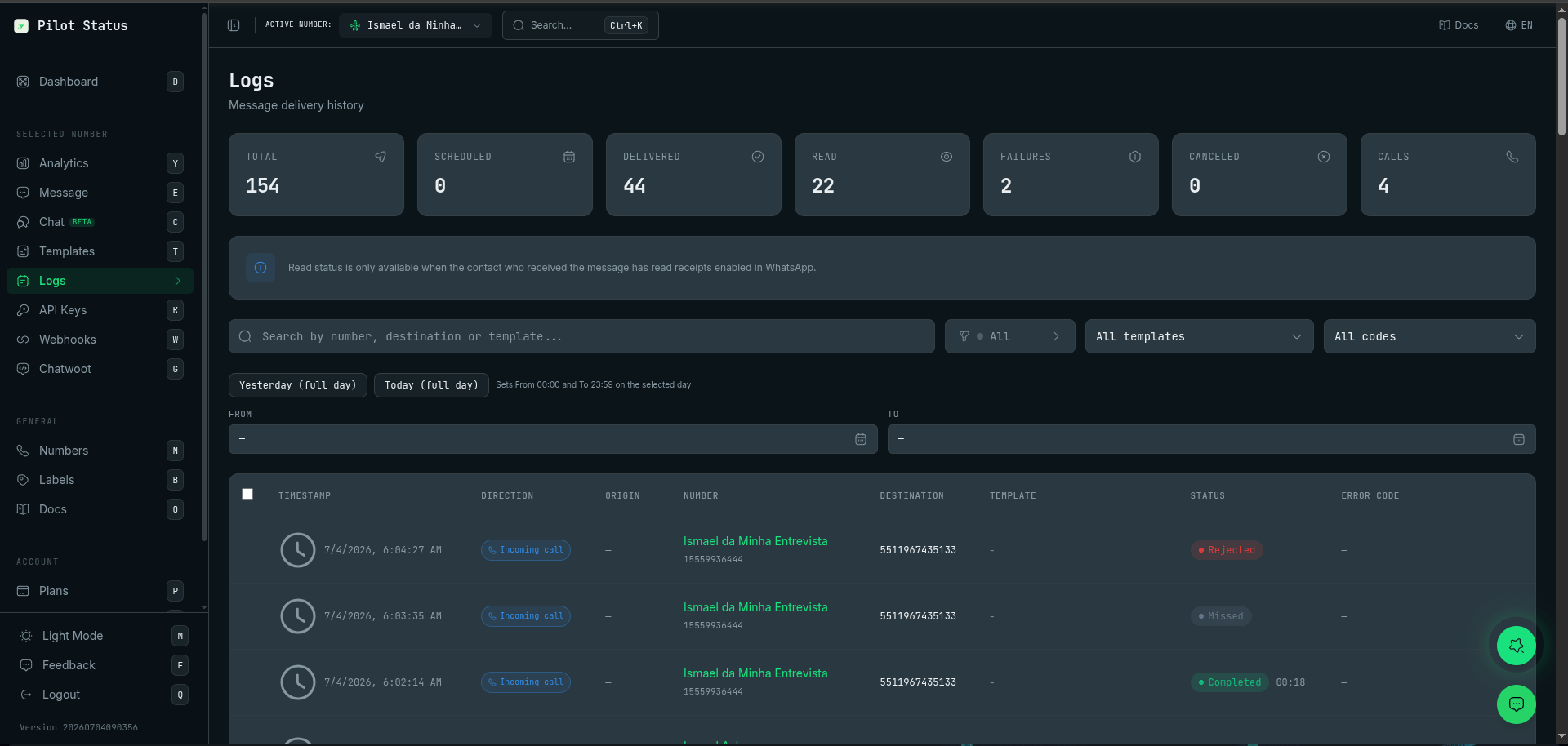
Calls in the Logs page — each call appears with direction, status (Completed with duration, Missed, Rejected), and its own CALLS counter.
Next steps
Calls API Reference
Every endpoint, parameters, and per-provider behavior.
Voice Calls Guide
Step-by-step: place a call, answer, permissions, softphone.