

Remote pairing — hosted pairing link
For SaaS platforms that manage numbers for end customers, Remote Pairing lets you generate a pairing link instead of displaying the QR code yourself. Your customer opens the link, scans the QR (or runs Meta Embedded Signup), and the number connects to your account.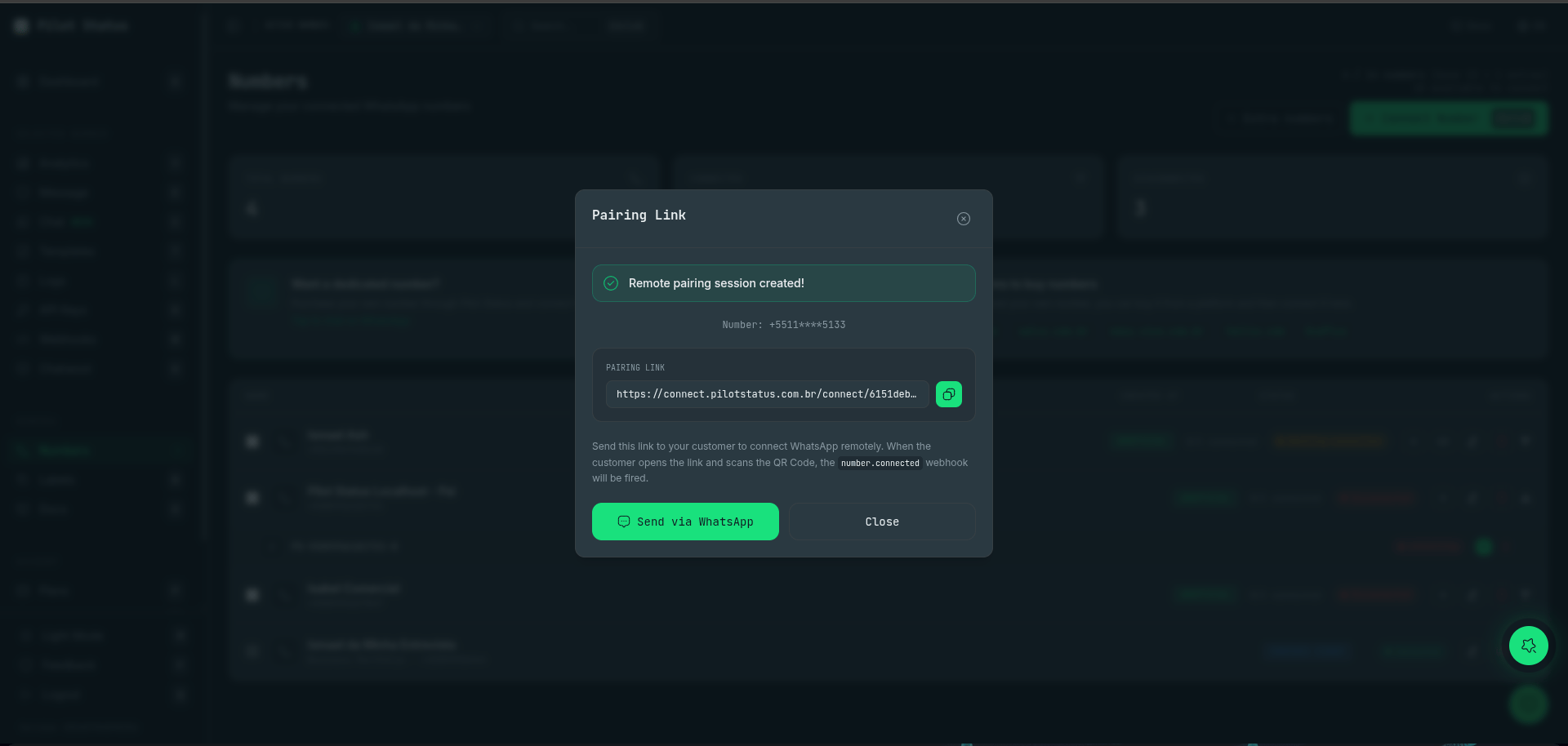
A remote pairing session — send the hosted link to your customer; when they scan the QR, the number.connected webhook fires.
POST /v1/numbers/remote-pairing
Same body asPOST /v1/numbers, plus pairing-specific options:
201:
POST /v1/numbers:
- The instance is created in
CLOSEstate (disconnected) — no QR code is returned. remotePairingUrlis the public link for the end customer. The endpoint only hands the link back — you deliver it to your customer yourself (your own UI, email, chat, wherever they are).- When the end customer opens the URL and connects, the
number.connectedwebhook fires normally.
linkToApiKey — retired
Accepted but does nothing. Sending it is not an error, and no API key is touched: linkedApiKeyId in the response is always null. It used to re-point a number-scoped key at the number you had just paired, silently unscoping it from the number it was bound to.
warnings on the 201
A successful pairing may come back with a warnings array of strings. It is present only when there is something to report.
For provider=PILOT_STATUS, externalRef and redirectUrl are accepted but cannot be honored: they ride the Meta signed session, and the QR pairing link carries no session. Each one you send is reported in warnings — and the pairing still succeeds. It is not a 400:
provider=META — the Meta branch is the one that carries them through the signed session.
History: decide it on this call
Whoever opens the link connects on the spot, and the provider hands the device history over right after — once. There is no moment in between for aPATCH, so this route accepts the settings block of number settings, for both providers:
201 for META:
settings.historyImportEnableddefaults totrue. Omit the block to keep the device history; sendfalseto drop it.numberIdis the placeholder the connection lands on. Use it to follow the connection (GET /v1/numbers/{id}/status) or toPATCHit before the person finishes.- An invalid block answers
400 INVALID_SETTINGSand nothing is created. - For
PILOT_STATUS, the block is applied only when this call creates the number.
Per-link branding (white-label)
The body also accepts an optionalbranding object to override the connect page’s logo/colors/title for just this link (snapshotted onto the token). It overrides the tenant’s saved branding. See Connect page branding.
Meta numbers: metaFlow
For official Meta Cloud API numbers the pairing link can run Meta flows instead of QR pairing:
metaFlow: "embedded"— the hosted page runs Meta Embedded Signup. Whoever opens the link authenticates with Facebook inside Meta’s own dialog and picks the business portfolio and the phone number there.metaFlow: "credentials"— the hosted page collects an existing WABA’s credentials. It also shows a route inbound webhooks to Pilot Status checkbox (on by default) that auto-subscribes that WABA to Pilot’s callback, so no manual webhook setup is needed — see webhook delivery.
Who authenticates decides who owns the WABA
The hosted page runs the same Embedded Signup component the dashboard runs, with the same app and the same configuration. Nothing in the pairing token pins a business portfolio. So the WABA lands in the portfolio of whoever logs into Facebook in that dialog — the end customer if they open the link, or you if an operator on your team opens it and selects your own portfolio. If your model is “the WABA is ours and we pay Meta”, have your operator run the link; if it is “the customer owns their WABA”, send the link to the customer. The API call is identical either way.Embedded Signup here is configured with
featureType: "whatsapp_business_app_onboarding" — Meta’s coexistence onboarding. The dialog shows the QR the number’s owner scans with the WhatsApp Business app on their phone, so the phone still has to be reachable at that moment, whoever is driving the dialog.POST /v1/numbers/meta — the BYO-WABA alternative
If you already hold metaPhoneId + metaWabaId + a system-user token server-side, POST /v1/numbers/meta attaches the number with no link and no end-customer interaction.
It is agnostic about coexistence — it attaches a coexistence number and a pure Cloud API number alike. What it does not do is anything Embedded Signup does for you:
Link lifetime: two different TTLs
The two providers mint two different credentials, and they do not expire on the same clock.
Read
expiresAt off the 201 rather than hardcoding either number. For a META link, the number also shows up immediately as a placeholder whose GET /v1/numbers/{id}/status answers PENDING and then EXPIRED — that is the signal to show your customer an “the link expired” message and mint a new one.
The connect page origin (postMessage)
When you embed the connect page in your own site, it talks to the host page over postMessage (connect:paired, connect:error, connect:expired). Both providers use the same host — it comes from one platform-wide setting, not from the provider — and in production that host is:
Better than hardcoding it: derive it from the link the API just handed you —
new URL(response.remotePairingUrl).origin. The host is a deployment setting; a receiver pinned to a literal breaks silently if it ever changes, while one derived from remotePairingUrl cannot drift.Errors
Both
402s carry the numbers behind the refusal — plan, maxNumbers, currentNumberCount, extras, proratedTotal, walletBalance and currency — alongside error and code. The Free-plan refusal for a phone that already exists carries only plan, maxNumbers and currentNumberCount. Branch on the code: the two share a status but not a remedy. See capacity errors.
Fixed:
INSUFFICIENT_FUNDS on this route now answers 402, the same status as POST /v1/numbers. It used to come back as a 500.Changed. A plan whose allowance was simply full used to answer
INSUFFICIENT_FUNDS here too, and the body carried nothing but the code repeated in both fields. It now answers PLAN_NUMBER_LIMIT_REACHED, with the capacity figures attached.Public token endpoints (no authentication)
The pairing page uses these token-based endpoints — you can also call them to build your own connect UI:
Notes:
- Free plan: when the workspace that issued the link is on Free, its allowance is already full and this number never connected,
POST /v1/remote-pairing/{token}/connectanswers402with{ "error": "PLAN_NUMBER_LIMIT_REACHED", "code": "PLAN_NUMBER_LIMIT_REACHED", "message": "…", "plan": "FREE", "maxNumbers": 1, "currentNumberCount": 1 }, and no QR code is generated.messageis a bilingual sentence,English | Português. The person holding the link cannot fix it: the workspace has to buy an extra number or move up a plan. See Free plan. - This is the
PILOT_STATUS(QR) token: it expires after 24 hours or upon successful connection (single-use). AMETAEmbedded Signup link is a different credential with a 30-minute TTL — see Link lifetime. POST .../connectonly works when the state is notOPEN.- The same connection state shown in the dashboard and the webhooks (
number.created,number.connected) apply.