

/templates) or via the public REST API (/v1/templates) and the MCP server (templates_create / templates_update / templates_delete). When sending, reference the template by templateId and pass a variables object with matching keys.
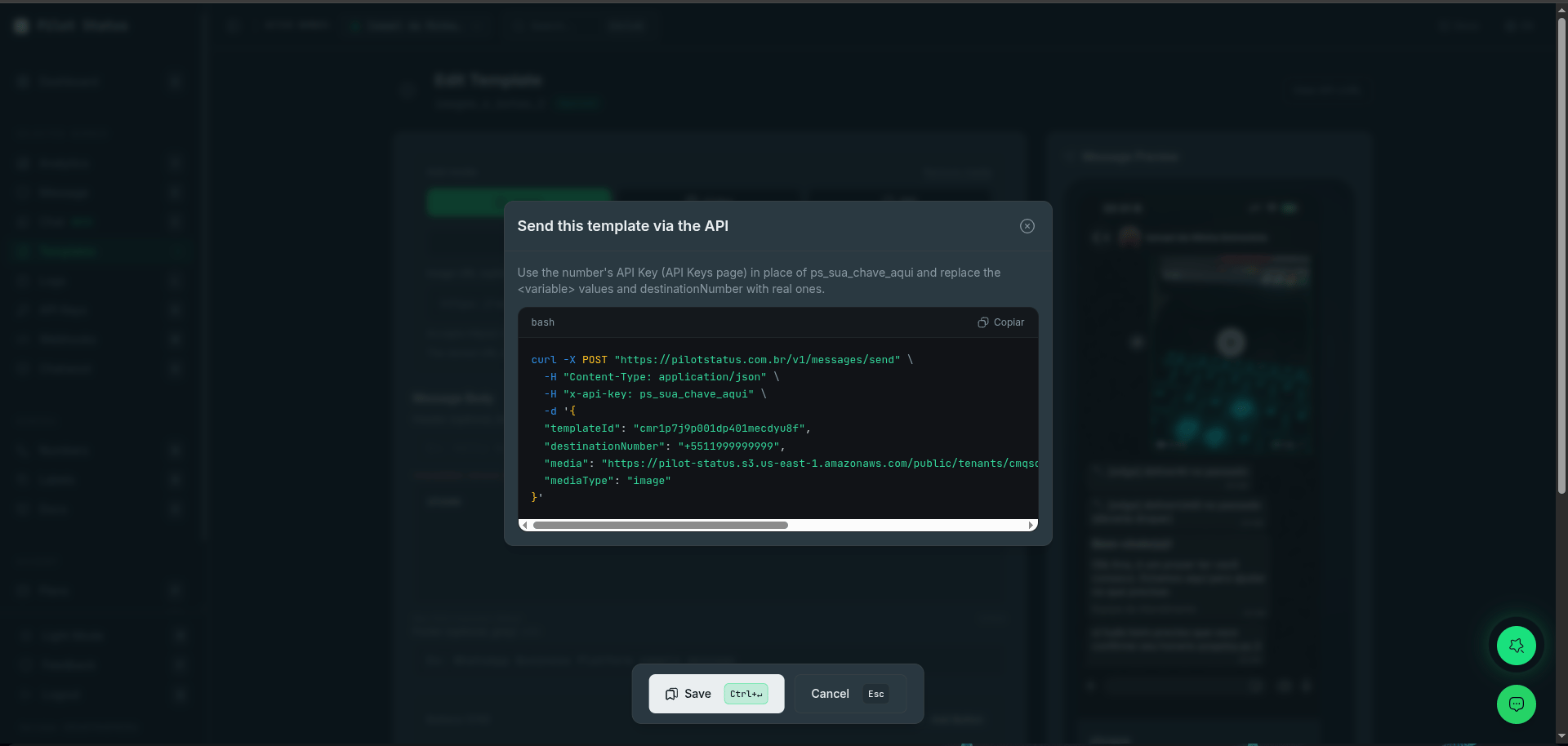
Every template has a ready-made API call — the editor's Send via API modal generates the exact curl with the templateId.
All requests use the
x-api-key: ps_... header (or x-api-key-id). Base URL: https://pilotstatus.com.br/v1.Category
Set at creation time; cannot be changed later.- MARKETING — promotional messages (more sensitive to WhatsApp policies).
- UTILITY — transactional messages (account updates, alerts, reminders).
- OTP — one-time / verification code messages.
Template structure
Only body is required.Header
- REST API: pass either
header.url(public http(s) URL) orheader.base64(data URI) — base64 is re-hosted server-side automatically. - MCP:
header.urlonly — base64 is not supported over MCP.
There is no
LOCATION header.Body
- Up to 1024 characters.
- Variables written as
{{nome}}(named style). - The body must not start or end with a variable.
- Emojis and multiple variables allowed.
Footer
Static text up to 60 characters. No variables.Buttons
Up to 10 buttons total; quick-reply and CTA buttons can be mixed.- Dynamic URL button: URL ends with a variable (e.g.
https://loja.com/promo/{{link}}) — one variable max, never in the domain. Sample value goes inexamples. On send, it is filled by its name (variables.link). A template created in Meta’s console with a numbered placeholder (https://ctlnk.io/{{1}}) is filled bybutton_<N>instead — see Button placeholders in templates created in Meta. - Copy-code: value goes on the button as
example(array, e.g.["PROMO10"]), alphanumeric only, up to 15 chars. Not for PIX keys or e-mails — for PIX, use thePAYMENT_REQUESTbutton below. On an official number thisexampleis only a sample: the code the customer copies goes invariablesasbutton_<N>on every send — see Copy-code buttons on official numbers.
PIX payment button (PAYMENT_REQUEST)
WhatsApp Pay Brazil payment button: the customer taps it and copies the PIX code. This is the right way to ship PIX copy-and-paste — COPY_CODE caps at 15 alphanumeric characters, while a real BR Code runs 100-400 characters with punctuation.
The code is a per-send value: put a variable in the button’s example and pass the real code in variables at send time, like any other variable.
This button requires Meta to have enabled payments on your WhatsApp Business Account. Enablement is gradual and per-account — Meta’s own wording is “this feature is rolling out and might not be available yet for your WhatsApp Business account”. On an account without it, Meta refuses the template with
100 / subcode 2388128 (“Button at index 0 has unexpected type (PAYMENT_REQUEST)”). There is no API field to check this — the only way to know is to try creating one.ORDER_DETAILS (the itemized order card) can be built, previewed and saved — see Itemized order card.
- Buttons are allowed together with a video or document (PDF) header.
Variables & examples (required)
When creating/updating via REST or MCP you must include anexamples object mapping every variable used (body + header text + dynamic URL) to a real sample value. The copy-code value is the only exception (it lives on the button).
GET /v1/templates/{id} returns all detected keys in the top-level variables array (a string[]) — supply all of them in variables on send. There is no latestVersion object in the public API response.
Button placeholders in templates created in Meta
A template created in Meta’s WhatsApp Manager and synced into Pilot Status (source: "META") with positional placeholders numbers a dynamic URL button’s variable on its own: in https://ctlnk.io/{{1}}, that {{1}} is not the body’s {{1}}. Send its value as variables["button_<N>"], where N is the button’s position in the template’s button list, starting at 1 — every button counts, static ones included. Pass only the variable part (the URL suffix), not the full URL:
GET /v1/templatesandGET /v1/templates/{id}list the key invariables—["1", "2", "3", "button_1"]for the template above.- A send without it, or with an empty value, is refused with
400 MISSING_TEMPLATE_VARIABLES(orINVALID_TEMPLATE_VARIABLE_VALUE) naming the key, instead of being accepted and failing later with Meta131008. - Named placeholders are unchanged: a button created in Pilot Status as
https://loja.com/promo/{{link}}is filled byvariables.link. - The same
button_<N>key carries the code of a copy-code button on an official number — see below.
Copy-code buttons on official numbers
For Meta, the code typed on aCOPY_CODE button at creation is only an example; the code the customer copies is a required parameter of every send. So on a template approved by Meta (source: "META" — every template on an official number, created in Meta’s console or in Pilot Status), a copy-code button whose value has no {{variable}} (a fixed example such as PROMO10) takes its code as variables["button_<N>"], with the same rule: N is the button’s position in the template’s button list, starting at 1, every button counts. For buttons [QUICK_REPLY, COPY_CODE] with the example PROMO10:
GET /v1/templatesandGET /v1/templates/{id}list the key invariables—button_4for thepromo_cupomtemplate in Create via REST API.- A send without it, or with an empty value, is refused with
400 MISSING_TEMPLATE_VARIABLES(orINVALID_TEMPLATE_VARIABLE_VALUE) naming the key. Theexamplekeeps its creation limit (15 alphanumeric characters); for the code sent, Meta’s limit is 20 characters. - A copy-code button whose example is a named variable (
["{{cupom}}"]) is still filled byvariables.cupom. An authentication (OTP) template’s code button still takes the body’s code. - Unofficial (web/QR) numbers: the copy code is generated per send there too — write it on the button as a
{{variable}}(e.g.["{{cupom}}"]) and fill it invariables.
Character limits
Create via REST API
bodymay be an object (recommended), a JSON string, or plain text (body-only templates).- Edit with
PUT /v1/templates/{id}(same shape); remove withDELETE /v1/templates/{id}— for a Meta template this also asks Meta to delete it, and the response depends on Meta’s answer (see Delete). GET /v1/templates/GET /v1/templates/{id}returnsource(META|PILOT_STATUS),metaStatus(APPROVED|PENDING|REJECTED|DISABLED|null),metaLanguage, andsendable— on a Meta number onlyMETAtemplates withmetaStatus: "APPROVED"are sendable.
Delete
DELETE /v1/templates/{id} no longer always returns success. For a Meta template the deletion is forwarded to Meta, and the outcome depends on what Meta does:
- A
200 { "deleted": true, "id" }is the only response that means the template is really gone — removed on Meta and locally. - A
409means nothing was removed: Meta rejected the deletion (e.g. the system token lacks permission on the WABA), so the template still exists on Meta and its name stays reserved. The local row is kept, and the message names the template and the reason. Fix the underlying permission and retry. - If Meta reports the template does not exist (a genuine 404 / “template does not exist”), the stale local row is removed and you still get
200 { "deleted": true, "id" }.
Carousel templates
A carousel template is an approved template whosebody carries a carousel block: a horizontally-scrollable strip of 2–10 media cards, each with its own image, body line and buttons. Carousel templates are Meta-only and always category MARKETING — on a Meta number the create is submitted to Meta as a CAROUSEL component.
Unlike the session carousel (interactive, quick-reply only — a URL button there returns 400), a template carousel card may mix QUICK_REPLY and URL buttons in the same card.
The carousel block
It sits inside body next to body.text — the message shown above the cards (the carousel body).
Caps (validated at create and update)
The same caps and media rules apply toPOST (create) and PUT (update) — validation is no longer skipped.
Card media — each
card.media.url must be a public https URL ending in .png, .jpg, .jpeg or .webp, with no query string. Meta accepts an unreachable image with 200 and then delivers nothing, so the URL is fetched and refused before submission with a typed error naming the offending card.
A top-level
header is not allowed with carousel (media lives on each card), and card buttons replace top-level buttons.Create a carousel template
QUICK_REPLY + URL pair declared in cardTemplate.buttons, in that order. A card that omits a button, reorders them, or changes a type is rejected before dispatch.
Approval
- Meta numbers: templates are submitted to Meta for review (“Submit to Meta” in
/templates, or on save). Categories, language and status follow Meta’s rules. - Unofficial (Pilot Status web) numbers: templates are created locally and immediately usable — no approval step.
Not supported
LOCATION (header or button), CATALOG/MPM, LIMITED_TIME_OFFER, OTP autofill/one-tap/zero-tap, and VOICE_CALL buttons. (Session carousel — the non-template kind — is covered in the Send message reference.)
FLOW buttons are supported on Meta numbers — see Sending a Flow. ORDER_DETAILS (the itemized order card) can be built, previewed and saved — see Itemized order card for the behavior per number type.
The NAMED parameter_format is supported: a template authored in Meta’s console with named variables ({{customer_name}}) imports with the right variables and sends with parameter_name on each parameter.
Submit & rejection errors
Link/URL buttons accept a single variable that must be at the end of the URL and never in the domain; call buttons need the country code (e.g.+55).
Checked before submitting to Meta
API-side validation
Meta rejected the submission
Rejected after review
Blocks when sending (even approved)
Common error when sending
404 — template without an approved version (doesn’t exist for the key, or Meta template has no approved version yet).