

/templates), via the REST API (/v1/templates), or through the MCP server (templates_create / templates_update / templates_delete). When sending, reference the template by templateId in POST /v1/messages/send and pass a variables object with matching keys.
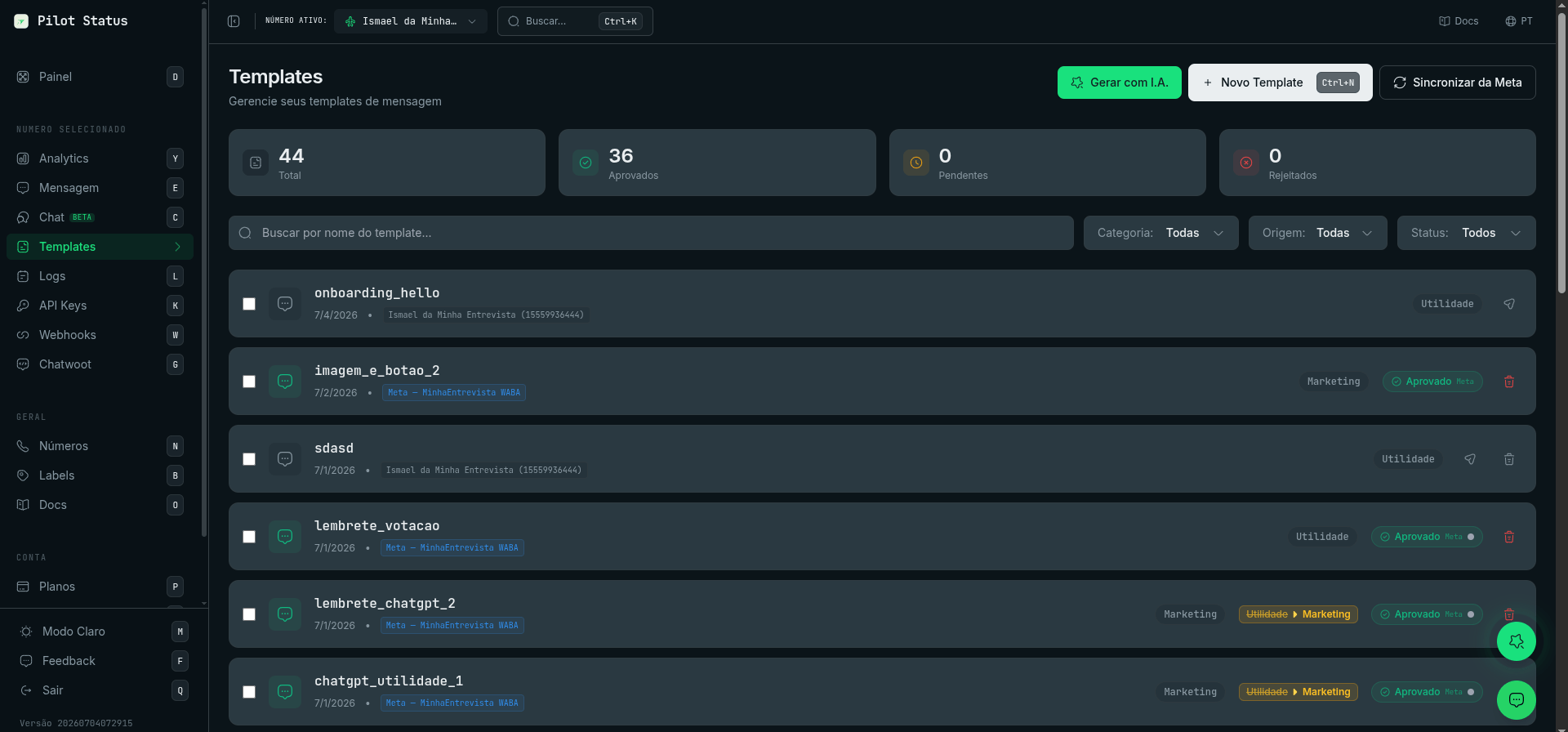
The Templates page — generate with AI, submit to Meta, and see approval status and category per template.
Categories
The category is set at creation time and cannot be changed later:- MARKETING — promotional messages (most sensitive to WhatsApp policies).
- UTILITY — transactional messages (account updates, alerts, reminders).
- OTP — one-time / verification code messages.
Meta approval vs. local templates
- Official (Meta) numbers: when you save a template with a Meta number selected, the dashboard asks whether to submit it to Meta for review now or keep it as a draft and submit later. Once submitted, category, language, and approval status follow Meta’s rules. A template is only sendable on a Meta number after it has an approved version.
- Unofficial numbers (Pilot Status web): templates are created locally and are immediately usable — there is no approval step.
GET /v1/templates carry a source field (where the template came from), a metaStatus field (Meta review status, e.g. PENDING, APPROVED, REJECTED), and a sendable flag indicating whether it can be used for sends right now.
Template structure
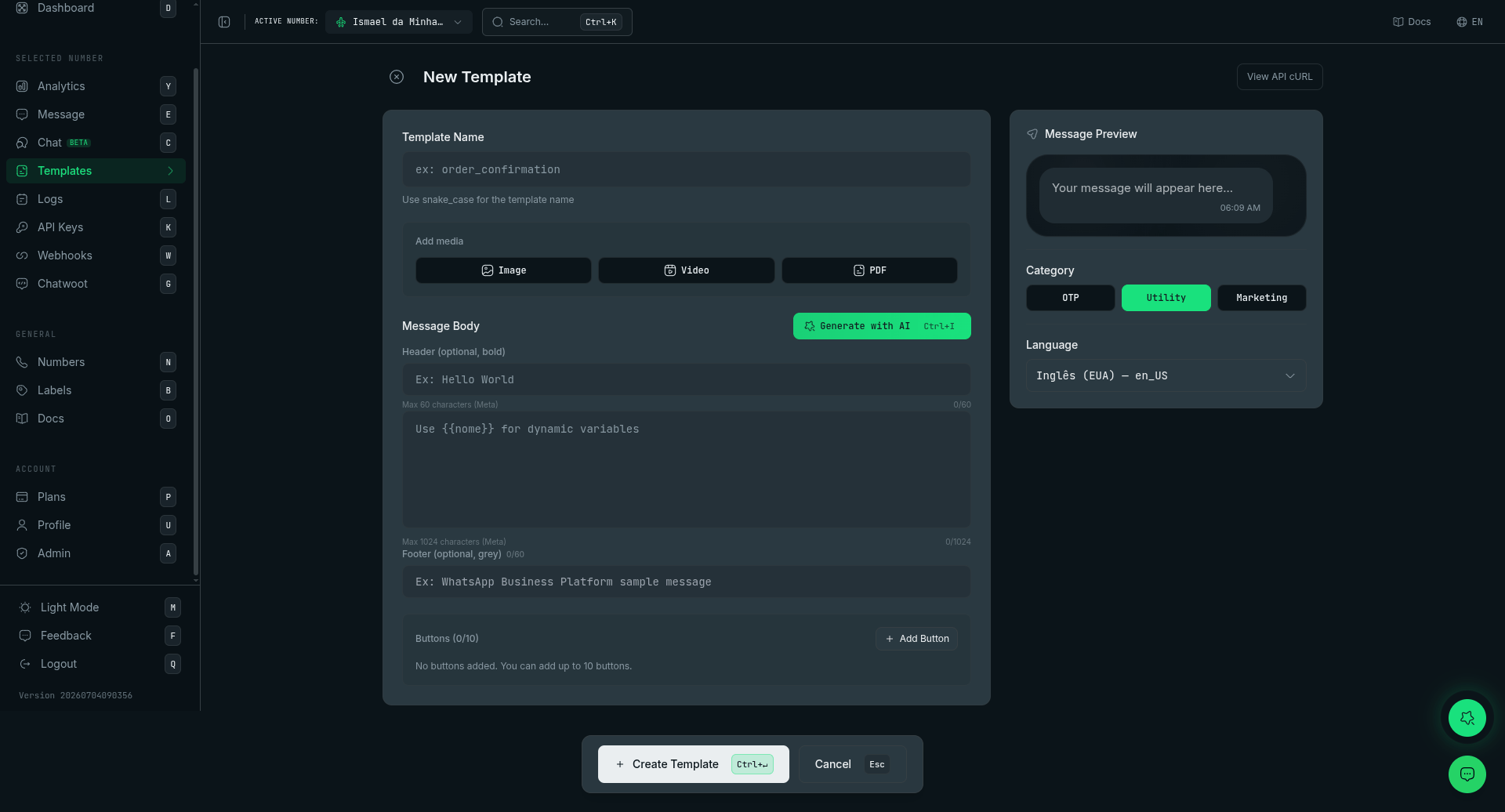
The template editor — name, media, body with {{variables}}, buttons, category (OTP/Utility/Marketing), language, and AI generation.
Media header values: via REST pass
header.url (public http(s) URL) or header.base64 (data URI, re-hosted server-side automatically). Via MCP only header.url is accepted.
There is no
LOCATION header. Also not supported: CATALOG/MPM, LIMITED_TIME_OFFER, OTP autofill/one-tap/zero-tap, and VOICE_CALL buttons.Carousel templates are supported on Meta numbers — category MARKETING, 2–10 media cards; see Carousel templates.FLOW buttons are supported on Meta numbers — they open a Flow inside the chat. The button binds by flow_id, flow_name, or inline flow_json. ORDER_DETAILS (the itemized order card) can be built, previewed and saved; submitting it to Meta is attempted on the current Graph API version and, when the account is not yet eligible for WhatsApp Pay, the refusal comes back as a clear eligibility error instead of a cryptic Meta 400.On unofficial (web) numbers templates support up to 3 buttons total, and the editor preview shows exactly how the message is delivered for the selected number — including live {{variable}} substitution with your example values.The NAMED parameter_format is supported: a template authored in Meta’s console with named variables ({{customer_name}}) imports with the right variables and sends with parameter_name on each parameter.PIX payment button (PAYMENT_REQUEST)
Delivers a PIX copy-and-paste code (BR Code). This is the right way to ship PIX — COPY_CODE caps at 15 alphanumeric characters, while a real BR Code runs 100-400 characters with punctuation. The button works on both number types, rendered differently:
- Meta (official) numbers — the WhatsApp Pay payment card (“Pagar com” row + rail icon), when the account has payments enabled (see the note below).
- Unofficial (web) numbers — delivered as a “Copiar código Pix” copy button carrying the full BR Code (no length limit; validated on real devices). It combines normally with the template’s other buttons, and the editor preview shows this exact form.
example and pass the real code in variables at send time, like any other variable.
This button requires Meta to have enabled payments on your WhatsApp Business Account. Enablement is gradual and per-account — Meta’s own wording is “this feature is rolling out and might not be available yet for your WhatsApp Business account”. On an account without it, Meta refuses the template with
100 / subcode 2388128 (“Button at index 0 has unexpected type (PAYMENT_REQUEST)”). There is no API field to check this — the only way to know is to try creating one.Itemized order card (orderDetails)
A template can carry an itemized order card — PEDIDO #reference, items with quantity, a “Pagar com” payment row and the total — stored as an orderDetails block (order with items/subtotal/tax in integer minor units, plus paymentSettings with the payment rail). Behavior per number type:
- Meta (official) — the card is built, previewed and saved; submission to Meta is attempted on the current Graph API version and returns a clear eligibility error when the account lacks WhatsApp Pay.
- Unofficial EVO_V2 — the card is deliverable today (
review_and_pay). When the template also carries body text, buttons or a media header, they are delivered first as a normal message and the order card follows as a second message; if the card fails after the first message was delivered, the send is marked failed (no retry, to avoid duplicating the text). - Unofficial EVO_GO — there is no itemized card; when the order carries a PIX rail it degrades to a “Copiar código Pix” copy button appended to the template’s other buttons.
{{variables}} like any other field. Numeric fields — item price, quantity, subtotal, tax, total — also accept a single {{variable}} token: the example must be a non-negative integer (minor units, i.e. cents), the real value is substituted at send time, and a send with a corrupted numeric value is refused rather than delivered with a wrong amount.
Variable rules
- Write variables as
{{name}}in the body, text header, and dynamic URL buttons (e.g.https://shop.com/promo/{{link}}— one variable, at the end of the URL, never in the domain). - The body must not start or end with a variable — always include literal text at both ends.
- When creating/updating via API or MCP, an
examplesobject mapping every variable to a real sample value is required. Missing samples return400 TEMPLATE_EXAMPLES_REQUIREDwith the missing keys indetails.missing. - The copy-code value is the one exception: it goes on the button as
example(e.g.["PROMO10"]), not in top-levelexamples. On an official number thatexampleis only a sample — the code the customer copies goes invariablesasbutton_<N>on every send (see below). - When sending, every placeholder — including keys used only in buttons — must be supplied in
variables, and each value must be a non-empty string. - Numbered button placeholders (templates created in Meta’s console). A template created in Meta’s WhatsApp Manager and synced into Pilot Status (
source: "META") with positional placeholders numbers a dynamic URL button’s variable on its own: inhttps://ctlnk.io/{{1}}, that{{1}}is not the body’s{{1}}. Supply it asvariables["button_<N>"], whereNis the button’s position in the template’s button list, starting at 1 — every button counts, static ones included. Pass only the variable part (the URL suffix), not the full URL. A send without it, or with an empty value, is refused with400 MISSING_TEMPLATE_VARIABLES(orINVALID_TEMPLATE_VARIABLE_VALUE) naming the key.
{{1}}, {{2}}, {{3}} and a single URL button https://ctlnk.io/{{1}}:
https://shop.com/promo/{{link}} is filled by variables.link.
Copy-code buttons on official numbers. For Meta, the code typed on a copy-code button at creation is only an example; the code the customer copies is a required parameter of every send. So on a template approved by Meta (source: "META" — every template on an official number, whether created in Meta’s console or in Pilot Status), a copy-code button whose value has no {{variable}} (a fixed example such as PROMO10) takes its code as variables["button_<N>"], with the same N rule. For buttons [QUICK_REPLY, COPY_CODE] with the example PROMO10:
400 MISSING_TEMPLATE_VARIABLES (or INVALID_TEMPLATE_VARIABLE_VALUE) naming the key. A copy-code button whose example is a named variable (["{{coupon}}"]) is still filled by variables.coupon, and an authentication (OTP) template’s code button still takes the body’s code. On unofficial (web/QR) numbers the code is per send too: write it on the button as a {{variable}} and fill it in variables.
Text formatting
WhatsApp formatting markers work in the body:*bold*, _italic_, ~strikethrough~, monospace. The text header does not allow formatting markers, emojis, or line breaks.
Templates API
201:
GET /v1/templates/{id} returns all detected variable keys in the flat top-level variables array. For a template created in Meta’s console with a numbered button placeholder, the array also lists the button’s button_<N> key (e.g. ["1", "2", "3", "button_1"]), and on an official number it lists the key of a copy-code button without a {{variable}} — button_3 for promo_coupon above — supply every key it lists on send.
Common submission and send errors
A
404 when sending means the template does not exist for the key or — on a Meta number — it has no approved version yet.