

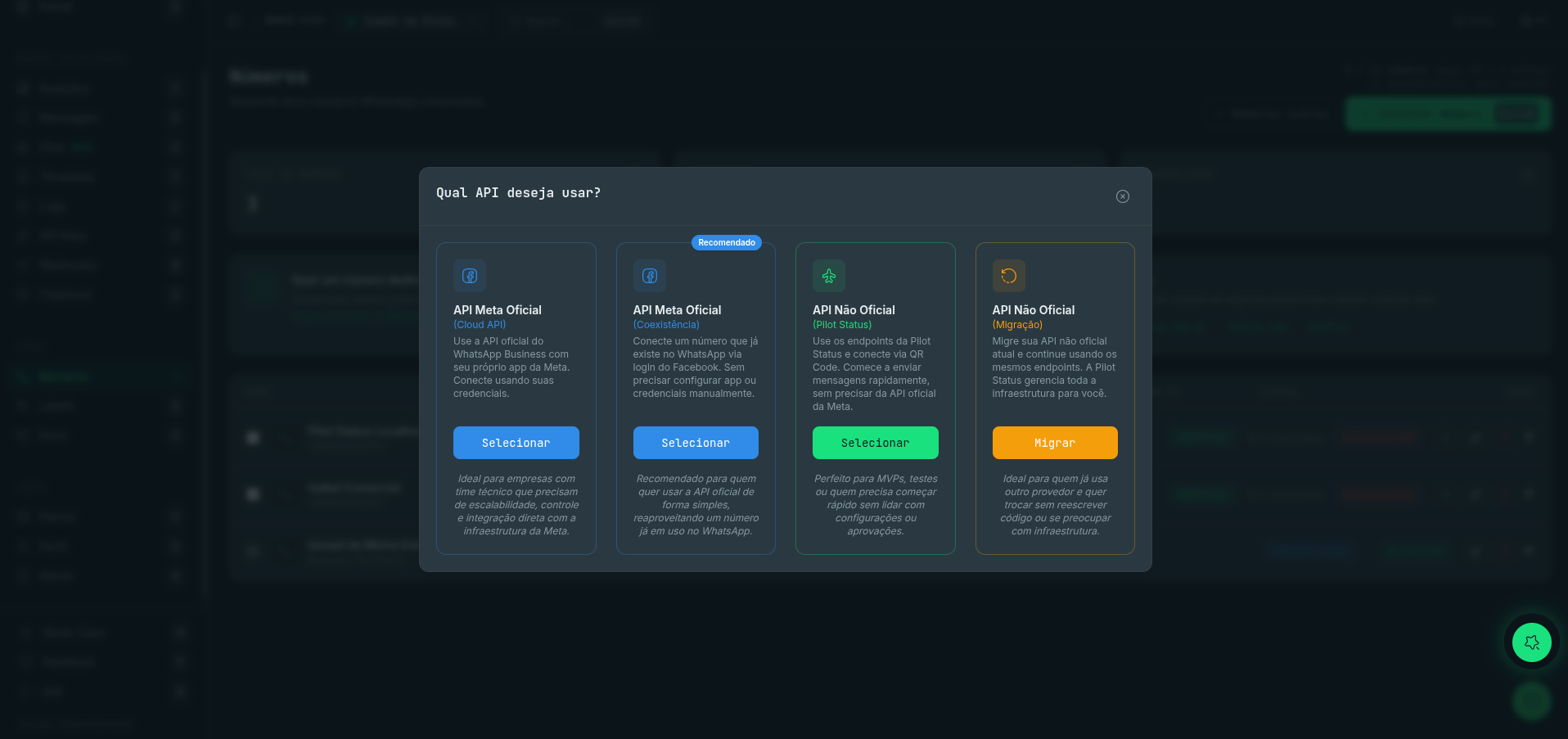
All four connection modes in the dashboard — two official (Cloud API, Coexistence) and two unofficial (QR code, migration).
Side-by-Side Comparison
Official API
- Setup: Connect via Meta Business account and WABA credentials
- Meta account required: Yes
- Templates: Must be pre-approved by Meta (OTP, Utility, Marketing)
- Groups / Newsletters: Not supported
- Proxy: Not applicable — traffic goes through Meta’s infrastructure
- Meta per-conversation fees: Yes — billed by Meta, not included in your Pilot Status plan
- Best for: Regulated industries, high-volume campaigns, production-grade deployments
Unofficial API
- Setup: Connect by scanning a QR code — no Meta account needed
- Meta account required: No
- Templates: No approval required — send any message freely
- Groups / Newsletters: Supported
- Proxy: Included and fully managed by Pilot Status
- Meta per-conversation fees: None
- Best for: Prototyping, internal tools, AI chatbots, SaaS onboarding
Official API
The Official API integrates with Meta’s infrastructure directly, giving you a compliant, production-ready channel for WhatsApp messaging. There are two variants available in Pilot Status: Cloud API is Meta’s hosted messaging solution. You connect your WhatsApp Business Account (WABA), submit your sender number for verification, and start sending. All message traffic flows through Meta’s servers, which means delivery is highly reliable and your integration is fully WhatsApp-compliant. Coexistence mode is a special variant of the Official API that lets your WhatsApp Business app continue running on your phone at the same time as the API integration. Your team can keep using the app normally while your backend sends and receives messages programmatically through Pilot Status — no need to choose one or the other. Because the Official API routes through Meta, all outbound messages to new conversations incur Meta’s per-conversation fees. These charges vary by country and message category and are billed directly by Meta — they are not part of your Pilot Status subscription.Unofficial API
The Unofficial API uses the WhatsApp Web protocol to send and receive messages without requiring a Meta Business account. You connect a number simply by scanning a QR code in the Pilot Status dashboard, the same way you would link WhatsApp Web on a browser. Once connected, Pilot Status manages everything behind the scenes: a dedicated, fully managed proxy keeps your session stable and handles the low-level connection details. You never provision or maintain any infrastructure yourself. The Unofficial API unlocks capabilities that the Official API does not support, including sending messages to groups, managing newsletter channels, and sending rich interactive messages without template pre-approval. Variables and dynamic content work exactly the same way as in the Official API.The unofficial API uses the WhatsApp Web protocol. While widely used, it is not officially supported by Meta.
Choosing the Right Mode
Use the guidance below to pick the connection type that fits your use case.Sending regulated messages (banking, healthcare, finance)
Sending regulated messages (banking, healthcare, finance)
Choose the Official API. Regulated industries require a compliant, auditable messaging channel. The Official API is WhatsApp-approved and gives you the traceability and reliability these environments demand.
High-volume marketing with approved templates
High-volume marketing with approved templates
Choose the Official API. Meta’s Marketing template category is designed for promotional campaigns at scale. Approval ensures your messages are delivered reliably and your account stays in good standing.
Quick prototyping or internal tools
Quick prototyping or internal tools
Choose the Unofficial API. You can be up and running in seconds — no Meta account, no template submission, no approval wait. It’s the fastest path from zero to a working WhatsApp integration.
AI agents and chatbots
AI agents and chatbots
Either mode works well. If you need to go live quickly or want to avoid Meta’s approval process, the Unofficial API is easier to start with. If your chatbot handles sensitive data or needs to operate at enterprise scale, the Official API gives you a more durable foundation.
SaaS products with customer-owned numbers
SaaS products with customer-owned numbers
Either mode is supported. The Unofficial API tends to be easier for customer onboarding — your users simply scan a QR code rather than setting up a Meta Business account. You can always migrate individual numbers to the Official API later as customers’ needs grow.