

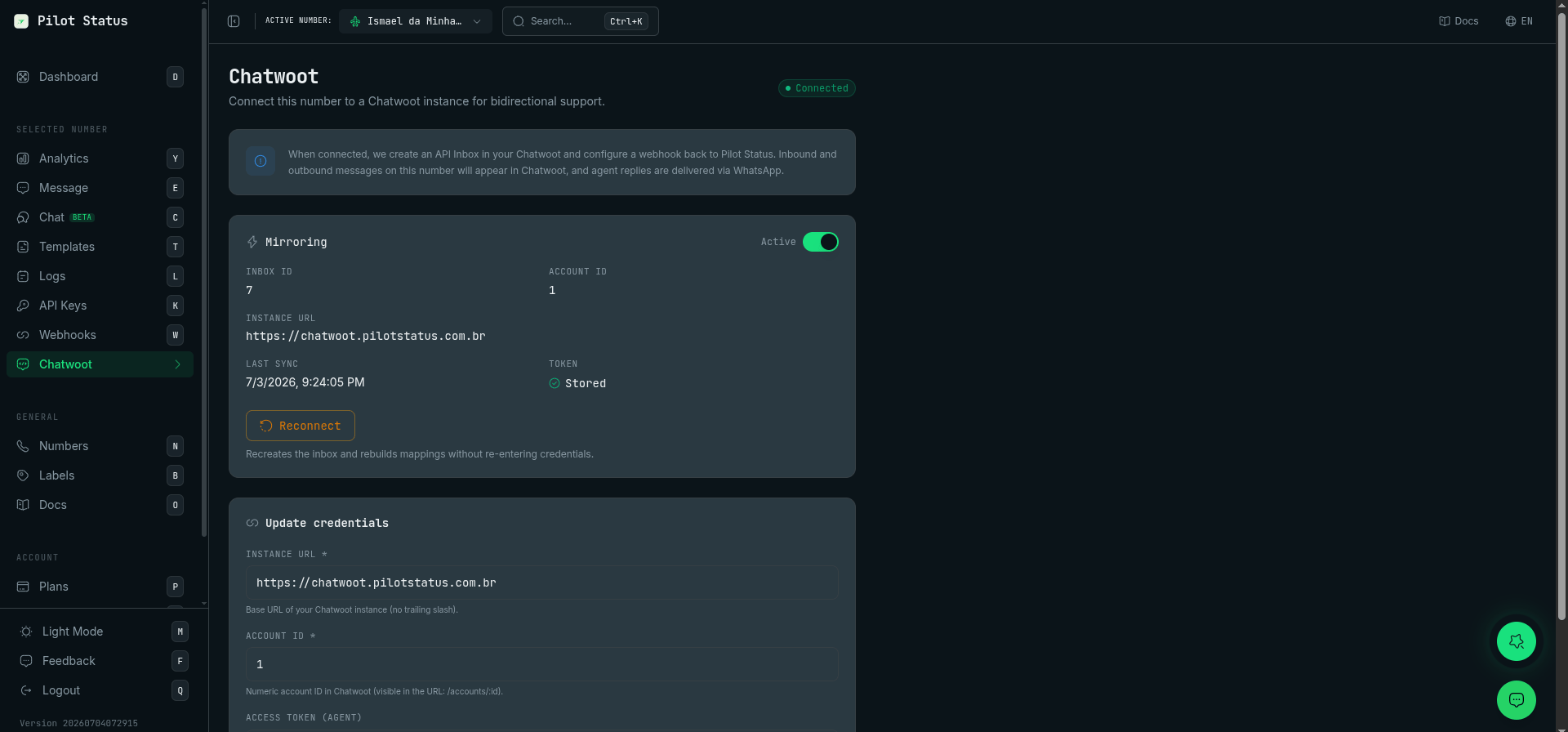
The Chatwoot page — connection status, mirroring toggle, inbox/account IDs, reconnect, and credential update.
Prerequisite: FRONTEND_URL (self-hosted Chatwoot)
If you run a self-hosted Chatwoot, its FRONTEND_URL environment variable must be set before connecting:
- Use the exact public URL (same scheme/host as the browser), no trailing slash, reachable from the internet — never
localhostor an internal IP. - Restart both the web and sidekiq containers afterwards (Rails derives
default_url_options[:host]from it at boot).
Missing host to link to! in the logs, the message shows as sent in Pilot Status, and the media arrives on WhatsApp.
Set up the integration
The integration is configured per number on the Chatwoot page of the Pilot Status dashboard.1
Gather three credentials from Chatwoot
- Instance URL — your Chatwoot base URL (e.g.
https://chatwoot.your-domain.comorhttps://app.chatwoot.com). - Account ID — the number in your Chatwoot URL after
/app/accounts/. - User Access Token — from your Chatwoot profile settings.
2
Connect in Pilot Status
Open the Chatwoot page in the dashboard, select the WhatsApp number, and paste the three values. Pilot Status automatically creates the inbox and the webhook in your Chatwoot account — you never paste a webhook URL manually. Unofficial (web/QR) numbers get an API inbox (message mirror); official Meta Cloud numbers get a native
whatsapp_cloud inbox — see the prerequisite below.3
Talk
Inbound WhatsApp messages (including media) open conversations in the new inbox; agent replies flow back to WhatsApp. Message history and delivery status stay in sync.
Channel mode: API mirror vs native Cloud
Every number connects in one of two modes. Pick it in the Channel mode selector on the Chatwoot page (default Automatic):- API mirror (Model A) — Pilot Status mirrors messages and media into a Chatwoot API inbox. Chat only (no native voice). It does not depend on
WHATSAPP_CLOUD_BASE_URL, so it works on a shared Chatwoot. - Native WhatsApp Cloud (Model B) — Chatwoot talks to Meta directly through the Pilot Status layer using a native
whatsapp_cloudinbox. Enables native voice/calling and native messaging (no mirror). Requires a dedicated Chatwoot withWHATSAPP_CLOUD_BASE_URLpointed at the layer (see the warning above). - Automatic (default) — official numbers → native; unofficial numbers → mirror.
Send a template from Chatwoot
On an API mirror (Model A) inbox, an agent’s reply goes out as an approved template — the way to reopen a conversation on an official number outside Meta’s 24-hour window — when it asks for one in either of two ways:-
The
/templatecommand. Type/template <name> [value1, value2, ...]in the composer: the comma-separated values fill the template’s{{1}},{{2}}, … in order. An argument writtenbutton_<N>=valuefills a button variable instead — a numbered URL placeholder or, on an official number, a copy-code button’s code — whereNis the button’s position in the template’s button list, starting at 1, every button counts (see Templates):Abutton_<N>=argument does not consume a positional number:Ana, button_2=SdjLn, 50fills{"1": "Ana", "2": "50", "button_2": "SdjLn"}. Values cannot contain commas —R$ 10,00would become two values (R$ 10and00). Any otherkey=valuetext stays a plain positional value. -
Chatwoot’s native template parameters. Templates sent with Chatwoot’s own
template_paramsare honored, including the structured format its WhatsApp template picker builds (processed_paramswithbodyandbuttons): body parameters fill the template’s variables, and button parameters (URL and copy-code) map by position tobutton_<N>.
Flow submissions arrive as a private note
A submitted WhatsApp Flow carries its answers ininteractive.nfm_reply, and neither channel mode shows them in the bubble:
- API mirror (Model A) — Pilot Status is in the path, so it fixes both halves: the public bubble is replaced with a short fixed line (
📋 Formulário respondido) instead of Meta’s label, and the answers are posted as a private note on the same conversation — onefield: valueline per answer. Agents read them in the same thread; the customer never sees the note. - Native Cloud (Model B) — Chatwoot reads Meta’s webhook itself and has no parser for
nfm_reply, so the message lands withcontent: null. That is a Chatwoot limitation; no setting here changes what its parser understands. Pilot Status does not mirror these conversations (doing so would double-post every message), so there is no private note on this mode and nothing we can add to the thread.
Model B has one way to read the answers, and Model A has a better one than the note: subscribe to the
flow.response_received webhook event. The note is a convenience for humans and caps each value at 500 characters; the event carries the whole submission, parsed. See Receive Flow responses.A note that fails to post is not retried — the bubble and the stored response are already there, and re-running the mirror would show the agent the same form twice. The event is the copy that retries.
What agents see in Chatwoot
- A reply Pilot Status refuses is marked failed, with the reason. When a reply written in Chatwoot cannot be sent — WhatsApp is refusing sends from the number, billing is suspended, the 24h window is closed on an official number, the
/templatename does not exist, the attachment has no public URL — the message is marked failed in Chatwoot with the reason on the bubble, and a private note in the conversation says why. It is not retried. The same failure is on the number’s Logs, with its error code. - Native Cloud (Model B): agent replies appear in Logs. Chatwoot sends a native-inbox reply to Meta itself, through the Pilot Status layer. Pilot Status records it as an outbound message with
origin: "CHATWOOT"in Logs,GET /v1/messagesandGET /v1/messages/history, and updates its status as Meta reports delivery and reads. It has no send detail, and it does not count toward your plan’s message usage. Details: Meta layer → Sends are recorded in Logs. - Native Cloud (Model B): messages sent through the Pilot Status API land in the contact’s open conversation. Chatwoot opens a new conversation for the contact each time the previous one is resolved; an API message follows it. With no open conversation, Pilot Status opens one, and the customer’s reply joins it.
- Native Cloud (Model B): “This message is unsupported. You can view this message on the WhatsApp app.” On coexistence numbers, WhatsApp sometimes delivers a placeholder (error
131060, “This message is unavailable”) before the real message, with the same message id — most often on the first message from a new contact, or after a long silence. Chatwoot keeps the first one it receives, so Pilot Status holds the placeholder for a few seconds and drops it when the real message arrives. When WhatsApp never delivers the content to the API, the placeholder is delivered as is: the message exists only in the WhatsApp app, and the bubble is your cue to check it there. - API mirror (Model A): media that is not available yet. The mirror waits up to 20 seconds for a received file to be stored, then posts the bubble with the attachment. If it is still unavailable, the bubble says
[mídia]followed by a link, and the link opens the file once it is stored. A file that arrives without a name is named after its kind and the message id — for exampleimagem-3EB03F18.jpg.
Send history to Chatwoot
Coexistence Meta numbers (a WhatsApp Business App migrated onto the platform via Embedded Signup) import ~30 days of chat history on connect. That history shows up in the dashboard /chat view but is not mirrored to Chatwoot automatically. On the Chatwoot page, the Sync history to Chatwoot button replays that already-stored history into the connected inbox.- Both channel modes (coexistence numbers). Works whether Chatwoot is connected as an API mirror (Model A) or a native
whatsapp_cloudinbox (Model B). The native replay is inbound-only — the customer’s incoming history is replayed; the business’s own outbound replies aren’t re-injected (they never appeared in the native inbox anyway) — and is best run in a maintenance window, since it can briefly notify agents as conversations are (re)created. - Order preserved, date in the body. Messages are posted oldest-first. Because Chatwoot stamps every posted message at import time (it does not accept a backdated timestamp), the original date/time is prefixed into each message body —
[dd/mm/yyyy hh:mm], in the tenant’s timezone. - Idempotent. Re-clicking is safe — it only re-posts messages that never landed.
- On finish (API mirror mode), the touched conversations are marked read and resolved so agents aren’t flooded with notifications. Native mode can’t mark-read automatically — run it in a maintenance window.
- Old media whose Meta reference has already expired may import as a
[mídia]placeholder (media bytes are captured to storage at import time, so recent media survives).
POST /v1/chatwoot/history-sync (number-scoped key), or the MCP tools chatwoot_history_replay (start), chatwoot_history_replay_get (progress), and chatwoot_history_replay_cancel.
Pause or disconnect
On the same Chatwoot page you can pause the sync per number (a toggle — nothing is deleted; flip it back to resume) or disconnect the integration entirely.Voice calls
Voice calls and the messaging inbox above are separate surfaces — WhatsApp call events are not posted into the mirrored conversations. There are two ways to work with calls:- Handle calls in the Pilot Status panel (shipped, no setup). The dashboard /chat page has a built-in softphone that answers and places WhatsApp voice calls for both connection types — Official (Meta Cloud API) numbers over WebRTC and unofficial (Pilot Status web) numbers over a server-side audio session. This is the fastest way to take calls right next to your conversations. See Voice Calls.
- Answer calls natively inside Chatwoot (advanced, self-hosted). Chatwoot v4.15+ ships a native voice channel that can be routed through Pilot Status for Meta Cloud API numbers: agents get a ringing call banner in the Chatwoot inbox and talk over WebRTC, while your Meta token stays with Pilot Status. Full validated walkthrough: Chatwoot Voice Calls. Chatwoot Cloud (
app.chatwoot.com) and unofficial numbers are not supported for this path.
Related
- Chatwoot Voice Calls — take WhatsApp calls inside Chatwoot via the Pilot Status Meta layer.
- Live Chat dashboard
- Data Retention & PII Modes — the Chatwoot relay keeps working even in
RELAY_ONLYmode.