

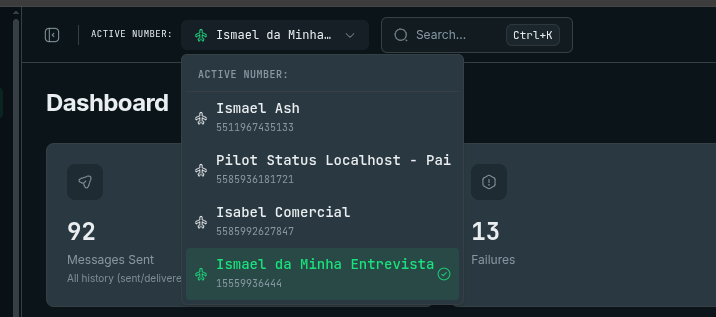
The active-number selector in the header — every per-number page (Chat, Templates, Logs, API Keys…) follows the number selected here.
What Is a Number?
A number represents one WhatsApp-connected phone number inside your Pilot Status project. When you connect a phone number — either by scanning a QR code (Unofficial API) or linking your WABA credentials (Official API) — Pilot Status creates a number object and assigns it a unique identifier. Each number is fully isolated from every other number in your project:- Separate message history — Conversations and logs for one number are never mixed with another.
- Independent webhooks — You configure webhook URLs per number, so each line can route events to a different endpoint.
- Dedicated logs — Connection status, errors, and activity are tracked individually.
- Its own API key — Each number has a number-scoped
ps_key; requests made with that key act on that number.
Multi-Number Projects
Your Pilot Status plan defines the maximum number of WhatsApp numbers you can connect simultaneously. Within that limit, you can connect as many numbers as you need and manage them all from a single dashboard and API. Running multiple numbers in a single project is useful for a range of scenarios:Load Distribution
Spread high message volumes across several numbers to stay within WhatsApp rate limits and keep throughput high.
Separate Brand Lines
Keep distinct brands or product lines on their own numbers, each with its own message history and identity.
Department Routing
Give your sales, support, and operations teams individual numbers so conversations stay organized and accountable.
Multi-Tenant SaaS
If you’re building a SaaS product on top of Pilot Status, the multi-tenant model lets each of your customers connect their own WhatsApp number under your single Pilot Status project. You don’t need to create a separate Pilot Status account for every customer — you manage the full fleet from one place. From your dashboard and API, you see every connected number across all your customers. You can inspect message history, configure webhooks, and trigger sends for any customer number. Each customer’s data remains isolated from every other customer’s. To send a message on behalf of a specific customer, use that number’s number-scoped API key in thex-api-key header — the key itself selects which WhatsApp connection sends:
Number Identifiers
Every number has a unique ID (e.g.cmm0abc123) that appears in webhook payloads (numberId) and management endpoints. There are two ways to find a number’s ID:
- Dashboard
- API
Navigate to Dashboard → Numbers. The ID for each connected number is displayed in the number’s detail panel. You can copy it directly from the interface.
Each plan includes a fixed number of connected numbers, and you can buy extra numbers as a recurring add-on. If your project requires a higher limit, contact Pilot Status to discuss a custom plan.