Pilot Status Quickstart: Send Your First WhatsApp Message
Create your Pilot Status account, connect a WhatsApp number, and send your first message via the REST API. No server or proxy setup required.
This guide walks you through everything you need to go from a blank slate to sending your first WhatsApp message via the Pilot Status API. You’ll create an account, connect a number, grab your API key, and make a live API call — no server setup or proxy configuration required.
1
Create your account
Go to pilotstatus.com.br and sign up for a free account. The free plan includes one WhatsApp number and up to 200 messages — no credit card required.
2
Connect your number
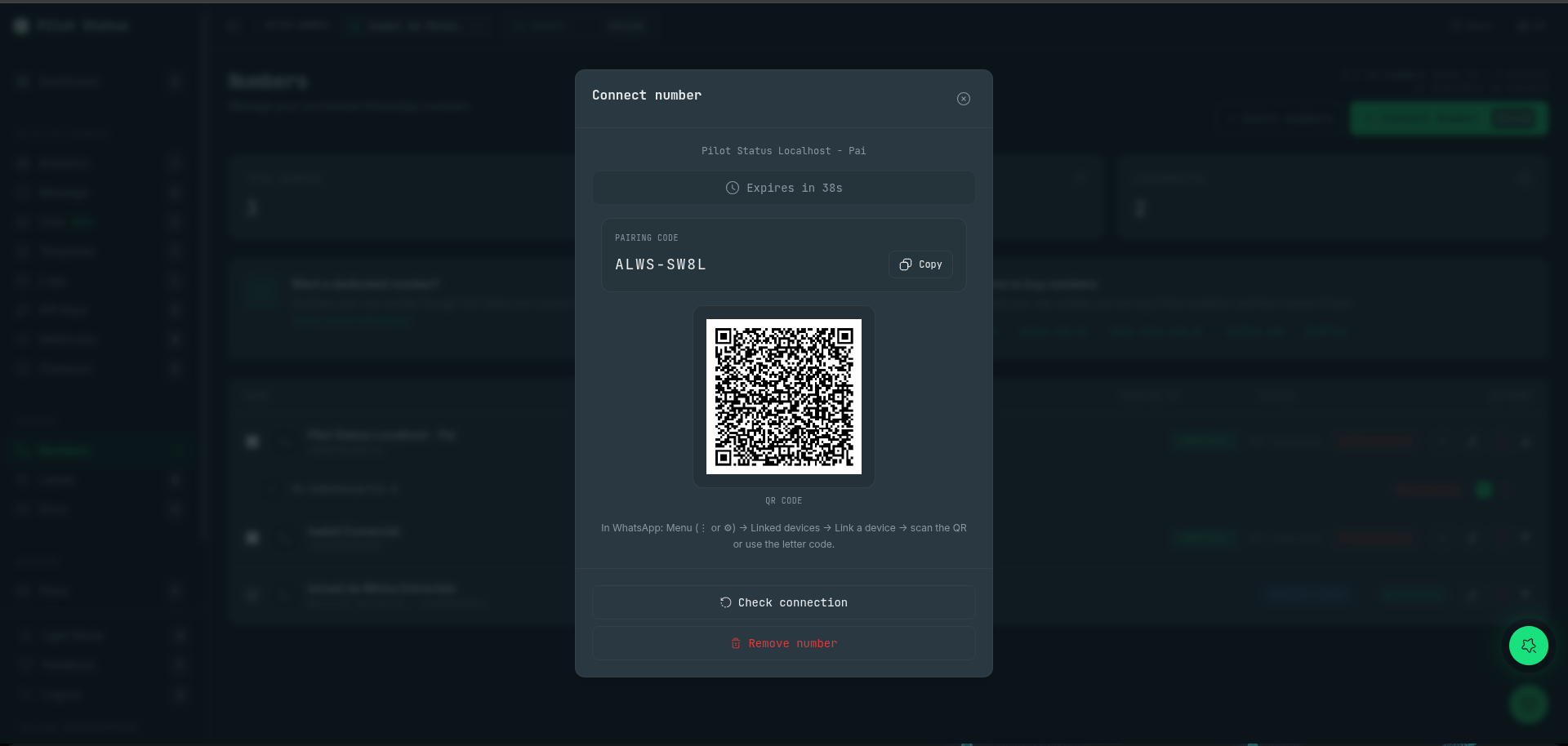
In the dashboard, click Connect Number and choose your connection method:
QR Code (unofficial): Open WhatsApp on your phone, tap Linked Devices → Link a Device, and scan the QR code shown in the dashboard.
Meta credentials (official): Select the Cloud API or Coexistence mode, then enter your Meta Business credentials and WhatsApp Business Account ID.
Connecting a number — scan the QR code or use the letter pairing code in WhatsApp (Linked devices).
Your number will appear as Connected once the handshake completes. For a full walkthrough of both methods, see Connect a WhatsApp Number.
3
Get your API key
In the dashboard, open the API Keys page (/api-keys) and copy the key for your connected number — it starts with ps_. Keep this value secret — it authenticates every API request you make.
4
Send your first message
Make the following request, replacing ps_your_key_here with your key and destinationNumber with a real WhatsApp number you can verify the delivery on. The key itself identifies which of your numbers sends the message.
curl -X POST https://pilotstatus.com.br/v1/messages/send \
  -H "x-api-key: ps_your_key_here" \
  -H "Content-Type: application/json" \
  -d '{
    "destinationNumber": "+5511999999999",
    "text": "Hello from Pilot Status! 👋"
  }'
A successful response returns HTTP 202 with an id and a status of QUEUED. Pilot Status delivers the message and fires your webhook as delivery and read events arrive. The same endpoint also sends templates (templateId + variables) and media (media + mediaType).
Phone numbers must be in E.164 format with the leading + — for example, +5511999999999 for a Brazilian number (+55), area code 11.
5
Receive events
To get real-time delivery receipts, read notifications, and incoming messages, create a webhook on the Webhooks page in the dashboard (or via POST /v1/webhooks). Pilot Status will POST a JSON payload to your URL within milliseconds of each event. You can use a service like Webhook.site to inspect payloads during development.