

Calling works on two provider types:
- Meta Cloud API numbers — official WhatsApp Business Platform numbers. Media flows over WebRTC (browser ↔ WhatsApp), so you exchange SDP offers/answers.
- Pilot Status web numbers (unofficial / QR-connected) — media is handled server-side. No SDP is exchanged; you drive audio through the
/playand/realtime-sessionendpoints instead.
400 FEATURE_NOT_SUPPORTED. A web number that isn’t connected returns 409 WHATSAPP_INSTANCE_NOT_CONNECTED.The two call types
Pilot Status does not charge anything for calls. On Meta numbers, minutes are measured in 6-second pulses (fractions round up to a whole pulse) and priced by destination country and monthly volume tier — see Meta’s official calling pricing and the billing details.
What both providers share
Regardless of provider, these endpoints work the same way:POST /v1/calls— place a business-initiated callGET /v1/calls— list callsGET /v1/calls/{callId}— get one callPOST /v1/calls/{callId}/accept— answer a ringing callPOST /v1/calls/{callId}/reject— declinePOST /v1/calls/{callId}/terminate— hang up
call.ringing, call.connected, call.ended (includes duration in seconds when answered), call.missed, and call.permission_updated.
The difference is how media is negotiated — SDP (Meta) vs. server-side (web) — and a few provider-specific endpoints described below.
Easiest path: the dashboard softphone
The dashboard /chat page has a built-in softphone that works on both number types — answer, place, reject, and hang up WhatsApp calls with no code at all. On Meta numbers it uses browser WebRTC; on Pilot Status web numbers the audio is handled server-side. This is the fastest way to try calling. Use the API below when you want to build your own calling experience.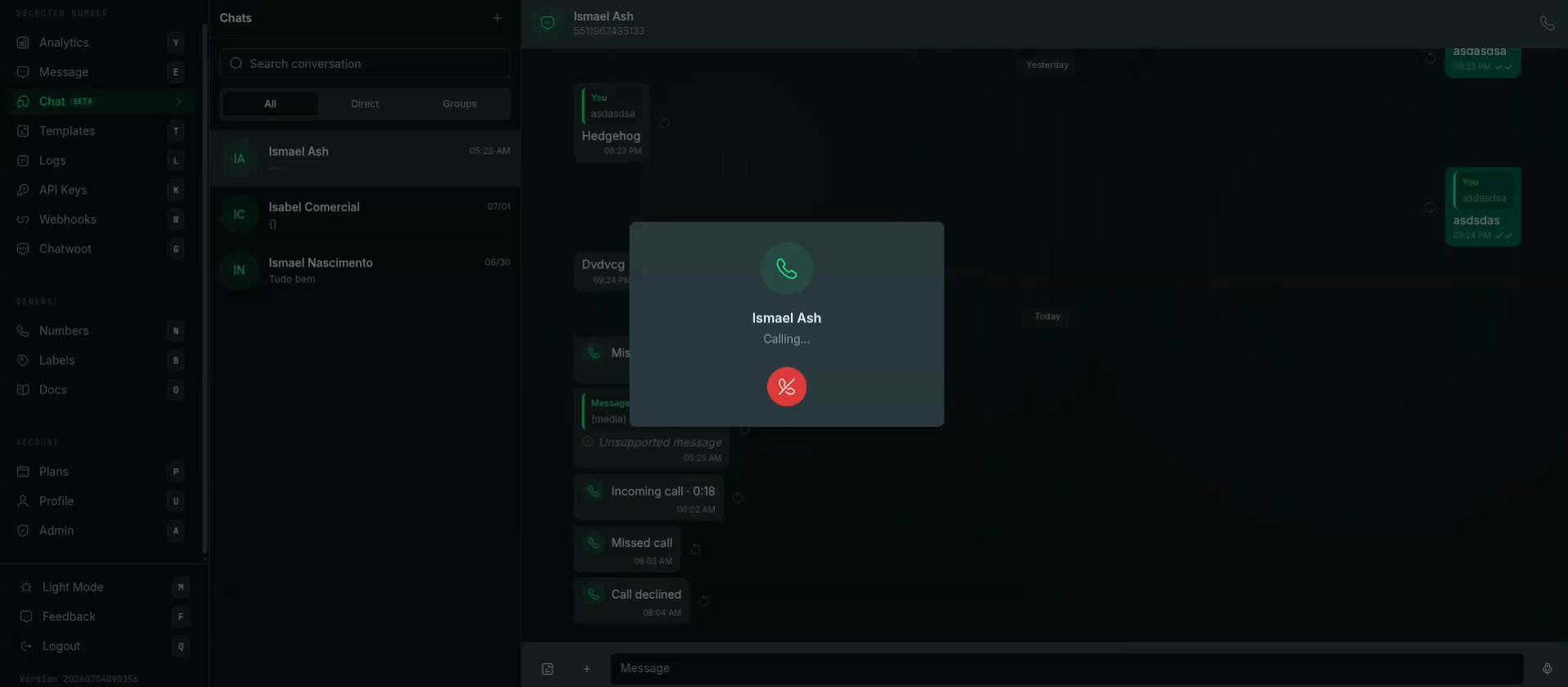
The built-in softphone in /chat — place, answer, and hang up WhatsApp calls; call events (incoming, missed, declined) appear in the conversation thread.
Meta Cloud API numbers
Requirements
- A connected Meta Cloud API number.
- Calling enabled on the number:
PUT /v1/calls/settingswith{ "status": "ENABLED" }. Numbers on a messaging tier below 2,000/day cannot enable calling (Meta error138015). - For business-initiated calls, a valid call permission from the user (see below).
- A payment method attached to your WABA — Meta bills business-initiated call minutes; without one the call fails with Meta error 131044 (
META_CALLING_PAYMENT_REQUIRED).
GET/PUT /v1/calls/settings, GET /v1/calls/permissions, POST /v1/calls/permissions/request, and POST /v1/calls/{callId}/pre-accept are Meta-only. On a web number they return 400 FEATURE_NOT_SUPPORTED.Step 1 — Get permission to call (BIC only)
You can only start a business-initiated call after the user grants a call permission. Request it inside the 24-hour customer service window:call.permission_updated webhook. Check the current permission any time:
no_permission, temporary, or permanent plus per-action limits. Without permission, POST /v1/calls returns META_CALL_PERMISSION_REQUIRED.
Step 2 — Place a call (BIC)
Your WebRTC client produces an SDP offer; pass it to Pilot Status, which relays it to WhatsApp. Audio then flows browser ↔ WhatsApp directly.Step 3 — Receive a call (UIC)
When a customer calls you, acall.ringing webhook fires. Answer with your SDP answer:
POST /v1/calls/{callId}/pre-accept— optional early answer that reduces audio clipping; the call still connects only onaccept.POST /v1/calls/{callId}/reject— decline (no body).POST /v1/calls/{callId}/terminate— hang up an active call (no body).
Pilot Status web numbers (unofficial)
Web numbers connect by QR code and handle media server-side — there’s no SDP, no WebRTC client, and no permission or settings surface. You place and answer calls, then drive the audio with two web-only endpoints.Place or answer a call
No permission request and no settings toggle are required. Just place the call:Drive the audio (web-only)
Once a call is connected, use these to control the audio stream:/play— the backend fetches your audio file (through an SSRF guard) and plays it into the live call. Great for greetings, IVR prompts, or pre-recorded messages./realtime-session— opens a full-duplex PCM16 WebSocket for real-time audio (e.g. an AI voice agent). The returnedwsUrllives on a dedicated public media host, uses a single-use token with a ~2-minute TTL, and you connect to it directly — it is not proxied and the HTTP layer does not upgrade the WebSocket.
Follow call progress with webhooks
Subscribe to these events on your webhook — they fire for both Meta and web numbers:call.ringing, call.connected, call.ended (includes duration in seconds when answered), call.missed, and call.permission_updated. On Meta numbers, the native calls envelope is also delivered for custom WebRTC signaling.
Next steps
Calls API Reference
Every /v1/calls endpoint, parameters, and settings.
Calling Overview
Signaling model, billing details, and limits.