

Send a WhatsApp Message
- Template send —
templateId(+ optionalvariables) - Free-form text send —
text - Direct media send —
media+mediaType(notemplateId, notext)
Exactly one mode must be used per request. There are no separate
/messages/text, /messages/media, or /messages/interactive endpoints.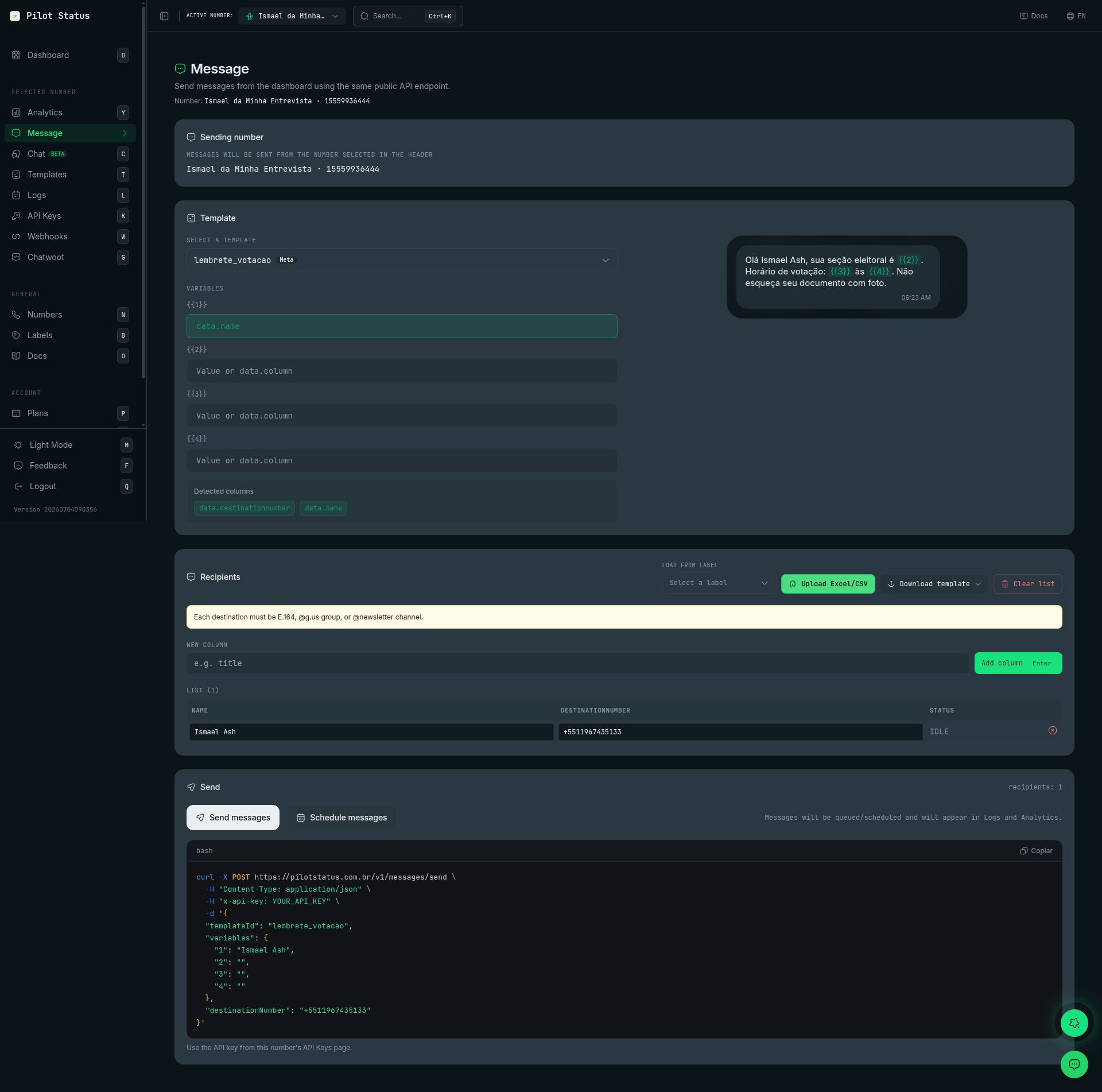
The Message page uses this same endpoint — pick a template, map variables to spreadsheet columns, upload recipients, and copy the auto-generated curl.
Headers
Content-Type: application/jsonx-api-key: ps_...(orx-api-key-id: <api_key_id>) — a number-scoped key
Destination (exactly one)
string
Destination phone in E.164 with a leading
+ (e.g., +5511999999999).string
WhatsApp group JID ending in
@g.us.string
WhatsApp channel JID ending in
@newsletter.Mode fields
string
Template from the dashboard
/templates. Mutually exclusive with text and direct-media mode.object
Key→value map for template variables. Missing required variables produce
MISSING_TEMPLATE_VARIABLES. For a template created in Meta’s console whose dynamic URL button has a numbered placeholder (https://ctlnk.io/{{1}} — not the body’s {{1}}), pass the button’s URL suffix as button_<N>, where N is the button’s position among the template’s buttons, starting at 1: { "1": "Maria", "button_1": "Gggkf" }. See Templates. On an official number, the same key also carries the code of a copy-code button whose value has no {{variable}} — { "button_2": "BLACKFRIDAY" }; see Copy-code buttons on official numbers.string
Body of a free-form message. Required if
templateId is not sent (and not doing a direct media send).string
A public http(s) URL or a base64 data URI (e.g.
data:audio/ogg;base64,AAAA...) to an image, video, document, or audio file. Base64 data URIs are accepted on Meta Cloud API and on unofficial (Pilot Status web) numbers. On unofficial numbers, Pilot Status uploads the decoded file to its own storage and sends the provider a URL; if that upload fails, the message fails with MEDIA_REHOST_FAILED. For stickers on unofficial numbers, use a public http(s) URL. Overrides any embedded mediaUrl in the template. Base64 is capped by decoded size: 50 MiB (52,428,800 bytes) when mediaType is document, 16 MiB (16,777,216 bytes) for every other type and when mediaType is omitted. Above the cap the request is refused with 400 Validation error, and details.fieldErrors.media names the limit. Send a larger file as a public http(s) URL — on Meta Cloud API numbers it is then held to Meta’s own ceilings (document 100 MB, video and audio 16 MB, image 5 MB), and a file above them fails after the 202 with META_MEDIA_TOO_LARGE. A URL — or a redirect it answers with — that points to an internal or private network address is never downloaded: the message fails after the 202 with MEDIA_DOWNLOAD_FAILED, on every number type.string
image, video, document, audio, voice, or sticker. Set it explicitly when the URL extension is not obvious (e.g. PDFs whose URL does not end in .pdf). voice is delivered as a WhatsApp voice note (PTT) on every number; audio is delivered as an audio file on official (Meta Cloud API) numbers and as a voice note on unofficial (Pilot Status web) numbers — to send a voice note, use voice (see Audio and voice notes). Before sending, audio is converted to AAC in MP4 (audio/mp4) on official numbers and to Ogg/Opus on unofficial numbers. For audio and voice, a presence indicator is shown to the contact just before delivery: unofficial (Pilot Status web) numbers show “recording audio” (gravando); Meta Cloud API numbers show “typing” (digitando) — the Cloud API has no recording variant, and it only appears when the conversation has a recent inbound message to attach to. Typing is shown before every conversational send on Meta and Evolution numbers; you can also trigger it independently via Typing Indicator. sticker sends a WhatsApp sticker — direct media send only, never with templateId, never with a caption, and the file must be image/webp at exactly 512×512 pixels (static up to 100 KB, animated up to 500 KB).Direct media send
Send media on its own by providingmedia + mediaType without templateId and without text. In this mode buttons, header, footer, and variables are not allowed; an optional caption is supported for image, video, and document but not for audio, voice, or sticker.
Media sends are available on every plan, including Free — they count against the number’s message quota just like any other message. There is no separate paid gate for sending media.
Scheduling and delivery window
string
ISO 8601 datetime to schedule the send.
string
ISO 8601 deadline for delivery. If it expires, the message fails (see Log Error Codes).
Other fields
string[]
Tag the destination with Labels (tenant scope). Processed asynchronously. With API key
retentionDays = 0, Labels are created but the phone/group linkage may not be persisted (PII).object
For MARKETING templates only.
aiRewriteEnabled: true enables automatic variation of the final message text to reduce repetitive patterns (anti-spam) while preserving intent. If variation cannot be applied, the original text is sent. MARKETING sends also receive an automatic variable queue delay (default 8–25 s) to space out sending pace.array
Up to 3 buttons that override the template’s buttons (except on Meta numbers — see below). Each button has
type and displayText plus type-specific fields:{ "type": "reply", "displayText": "Yes", "id": "yes" }— quick reply{ "type": "url", "displayText": "Site", "url": "https://example.com" }— URL button{ "type": "call", "displayText": "Call", "phoneNumber": "+5511999999999" }— call button{ "type": "copy", "displayText": "Code", "copyCode": "ABC123" }— copy button
buttons can be combined with any mediaType. The API does not reject buttons with mediaType: "video" or mediaType: "document" (unofficial numbers accept them); note that Meta Cloud API may reject some button + video/document combinations at delivery time.On Meta (official) numbers, a template’s buttons are fixed by the approved template: buttons does not replace them and does not fill a button variable. Fill a dynamic URL button through variables — by its name (e.g. link) or, for a numbered placeholder in a template created in Meta’s console, as button_<N>. A copy-code button’s code also goes in variables as button_<N>, not in copyCode.object
Header for a free-form interactive message. Requires
buttons. Types: { "type": "text", "content": "Header title" } (up to 60 chars), or image / video / document with a public URL as content.Message footer (max 60 characters). Requires
buttons.object
Interactive single-select list for a free-form send. Requires
text; mutually exclusive with templateId, buttons, header, and direct media (footer is allowed). See Lists below.Free-form restrictions
mediaandmediaTypecannot be used withtext(free-form).headerandfooterare only supported whenbuttonsis present (Meta Cloud API limitation).- On Meta numbers, free-form messages only work within the WhatsApp 24h conversation window. Outside the window, a
META_OUTSIDE_24H_WINDOWerror is returned in themessage.failedwebhook — use an approved template instead. You can check whether the window is open before sending withGET /v1/service-window.
Buttons
buttons attaches up to 3 interactive buttons — on a free-form text send, or to override a template’s buttons on a template send (not on Meta numbers — see the note below). Each item needs type + displayText and one type-specific field:
headerandfooterare only allowed together withbuttons(Meta Cloud API limitation).- Match reply taps by the label in
content+quotedMessageId— there is nobutton_idfield and nobutton_replyevent. - On Meta Cloud API numbers, free-form buttons only work inside the 24-hour service window. Outside it, send an approved template. Template buttons use a different vocabulary —
QUICK_REPLY,URL,PHONE_NUMBER,COPY_CODE,PAYMENT_REQUEST— defined when the template is created; see Templates.
On Meta (official) numbers, a template’s buttons are fixed by the approved template. On a template send there, request
buttons does not replace them and does not fill a button variable — fill a dynamic URL button through variables, by its name (e.g. link) or, for a numbered placeholder in a template created in Meta’s console, as button_<N> (see Templates). The code of a copy-code button goes the same way, as button_<N> — not in copyCode (see Copy-code buttons on official numbers).Lists
list attaches an interactive single-select list to a free-form text send: text becomes the message body and buttonText labels the button that opens the menu of rows. Mutually exclusive with templateId, buttons, and direct media:
- Caps (Meta’s, enforced uniformly on every number type):
buttonText1–20 chars, 1–10 sections, max 10 rows total across all sections, rowtitle1–24 chars, rowdescriptionup to 72 chars, rowidup to 200 chars (generated when absent). Sectiontitleis optional. - Works on both number types with the same request: Meta Cloud API numbers send the official interactive list; unofficial (Pilot Status web) numbers send the native list.
- The recipient’s selection arrives as a normal inbound message/webhook.
Examples
buttons does not replace the template’s buttons on a Meta (official) number: there the approved template’s buttons are fixed, and a dynamic URL button or a copy-code button’s code is filled through variables (see Buttons).
Response (202)
string
Internal message ID. Persist this — it is the value to use with
GET /v1/messages/{id} and it matches internalMessageId in webhooks.string
Correlation identifier for the send request.
string
Always
QUEUED on accept.Correlation with webhooks
- The
idfield in the response is the same as theidfield inmessage.sent,message.delivered,message.read, andmessage.failed. Onmessage.reply, usequotedMessageId(the WhatsAppmessageIdof your original message) andcorrelationIdto tie the reply to your send. - The WhatsApp
messageId(wamid) is not in the202body; it first appears on themessage.sentwebhook (and repeats on status events for that message). - Persist
idwhen you receive202and useGET /v1/messages/{id}with the same value.
Common errors
Asynchronous delivery failures (e.g.
META_OUTSIDE_24H_WINDOW, META_TEMPLATE_PAUSED, WHATSAPP_NOT_EXIST) surface as errorCode on GET /v1/messages/{id} and GET /v1/messages, in Logs, and via the message.failed webhook on unofficial numbers — see Log Error Codes.